Category: Strategies

Find the best strategies to get more traffic, sales, and revenue from affiliate marketing, blogging and becoming a leader in today’s world.

  • 12 Comparisons To Help You Decide Between AWeber and GetResponse

    12 Comparisons To Help You Decide Between AWeber and GetResponse

    If you want to be successful in blogging and online business, you need to start a mailing list. You probably heard about the term ‘the money is in the list‘ and that if you think that is just for Internet Marketers, you are absolutely wrong.

    It doesn’t matter if you are running a small blog or a corporate website; you need to have a god-damn mailing list! And when it comes to the best mailing list provider, you are spoilt with choices. With over a dozen email marketing providers around, we are constantly trying to get the best for our bucks. I mean, who doesn’t right?

    Prior to this, you should know that I am a huge fan of AWeber and I eve wrote a review about it. Read all about AWeber here.

    Recently, I was basically lured into the dark valley and got bribed by GetResponse with their 25% Christmas deal and being a human being, I was attracted to it … big time!

    [feature_box style=”8″ only_advanced=”There%20are%20no%20title%20options%20for%20the%20choosen%20style” alignment=”center”]

    Latest Update: Like email marketing? Read my latest comparison between MailChimp, ConvertKit, and Drip for 2017! Read more.

    [/feature_box]

    And I went through the whole process to migrate all my subscribers from AWeber to GetResponse and it was merely to leverage from the Christmas deal while giving it a go.

    Yes, call me crazy.

    Important disclaimer:

    I know there are probably hundreds or thousands of posts about AWeber vs GetResponse and seriously, I find them not much of a help as they are merely focusing on selling! In this review, I will be sharing with you what I think about both email marketing providers and of course, my personal opinion as a paying user myself.

    AWeber versus GetResponse

    AWeber vs GetResponse – The no-BS review

    In this review, I will sharing with you several criteria for my judging and thus, feel free to head to the relevant section for my write up. Of course, this could possibly be a very long review indeed!

    Criteria used for judging:

    1. Overview of both the email marketing companies (what?)
    2. Web signup forms designs
    3. Integrating with third party mailing list plugins
    4. Newsletter creation
    5. Autoresponder ability
    6. RSS to email feature
    7. Drag and drop editor
    8. Email delivery rate
    9. Ease of importing contacts
    10. Single opt-in and double opt-in
    11. Customer service and support
    12. The pricing factor

    While this is definitely going to be a huge list, I recommend you to bookmark this for future reference.

    1. Background check of AWeber and GetResponse

    AWeber

    AWeber was founded back in 1998 and it was then a huge hit when it comes to email marketing. As off 2011, AWeber was home to over 100,000 customers globally. By now, I believe they are serving over 300,000 clients worldwide.

    AWeber is used by several key figures such as Ileane Smith, John Chow and Adam Connell. For me, I love AWeber’s professional designs and outlook.

    Some claimed that AWeber is probably the best email marketing provider in the world.

    GetResponse

    GetResponse was founded back around the same time with AWeber and it is a great alternative to AWeber. At the moment, GetResponse has over 300,000 clients internationally and is one of the most interactive email marketing providers I ever come across.

    GetResponse is actively used by many bloggers, marketers and even huge corporations as well. Just like AWeber, it gets tons of great reviews from popular sites such as Mashable.

    There are also many die-hard fans for GetResponse when it comes to choosing the right tool to build a mailing list.

    Winner: There ain’t any winner in the background check. Both are highly creditable and reputed. Therefore, this is a draw.

    2. The battle of web forms and designs

    If you want to sky rocket your mailing list creation, you got to have beautiful signup forms that converts.

    AWeber

    I have been using AWeber for over 8 months before this and I got to admit, I love their well-designed sign up forms. At the moment, AWeber has over 140 beautifully crafted sign up forms to woo your visitors to sign up.

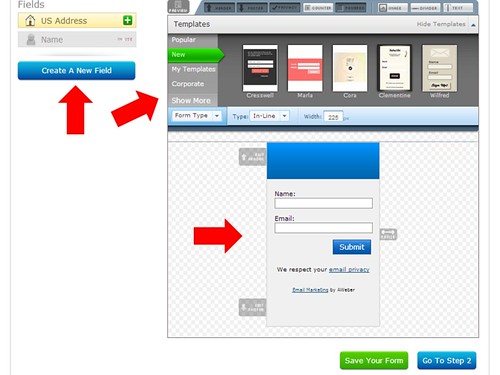
    Creating a sign up form on AWeber is easy and it offers 4 types of form such as inline, pop up, pop over and lightbox. For me, most of the sign up forms are beautiful and thus, it save me a lot of time when it comes to modification and this makes AWeber pretty much ready out-of-the-box.

    AWeber has a great Drag and Drop editor for designing forms but I think that is absolutely not needed since it comes with some very attractive ready-made templates.

    Now, if you are still unable to find a right template for yourself, don’t worry! AWeber team could provide support and even create a custom template for you! Yes, no joke!

    GetResponse

    GetResponse is something new to me and I am highly attracted to their very leisure outlook. You know, the vibrant colours and fonts … you get the point.

    When it comes to build a sign up form, GetResponse is pretty much opposite from AWeber. Of course, I am more towards the lazy type and expects a lot from my email marketing provider. In terms of sign up form designs, I find that GetResponse is pretty much not overly attractive. They are pretty plain in some way (I am comparing highly to my site only) right out-of-the-box to be honest.

    However, don’t get fooled with this. GetResponse is very powerful since it has a great Drag and Drop editor which I love to call to WYSIWYG (what you see is what you get). This means that every form you build is according to your liking.

    Winner: Since I am a huge believer that email marketing must be easy and less time consuming, AWeber is the clear winner here.

    3. Easy of integration with other mailing list plugin

    AWeber and GetResponse are equal in this comparison. The main reason is because both of these are very popular email marketing providers and thus, it is a no brainer to include easy integration with most of the mailing list builder plugins.

    Sign up forms generated with AWeber and GetResponse comes with both scripts and HTML codes which you can easily use and integrate to any plugin under 10 seconds flat.

    Furthermore, both offers features such as:

    • Self installing the codes
    • Emailing the codes to your developer(s)
    • Hosting it through AWeber or GetResponse servers

    I have tested with several optin plugins such as Hybrid Connect and Optinskin. Integrating both email marketing providers is as easy as A, B and C.

    Winner: Draw

    4. Creating a newsletter for your mailing list

    AWeber

    If you are interested to use AWeber, it is great for both HTML and plain text usage. Creating a newsletter using AWeber is easy as there isn’t any technical skills required. All you need is to choose the beautiful ready-made templates and you are probably all done and ready with it.

    AWeber has spam score value which are auto calculated based on the number of images, links and number of sensitive words in your newsletter. This is definitely a good thing as having a high score will actually increase the changes your newsletter landing in the spam box. Certainly, something you wouldn’t want to right?

    Once a newsletter is done, you are given two choices which you may decide to send immediately or schedule a different time. If you are deciding to schedule the newsletter, all you need to set is the time which is according to Eastern or Western time.

    Of course, you can also decide which mailing list which will be receiving the newsletter (aka segmentation).

    Personally, AWeber is great if you are very focused in text based newsletter.

    GetResponse

    Again, GetResponse is very opposite to AWeber and it is more focus in dynamic and responsive email newsletters. GetResponse has over 30 of ready made newsletter templates and all you need to do is to choose one that fits your need. Lastly, do some modifications according to your needs and you will be ready in no time.

    Of course, if you are adventurous and hardworking, you can just use the Drag and Drop feature and build your own custom newsletter.

    A huge feature which GetResponse has is that it comes with responsive email testing and preview. This means that there is an option for you to preview how the newsletter would look like on different smartphones, computer OS and even browsers! Oh yes, if you think that I am joking, I am not!

    Here’s what it (called as Inbox Preview) looks like:

    GetResponse Inbox Preview feature
    Inbox preview is a great feature to check on the email layout on various devices

    GetResponse also comes with spam score but it had to be done manually (one click button).

    Wait!

    There’s one more thing you should know about GetResponse; the revolutionary time-travel. With time-travel schedule featured enabled, all newsletters will be send out according to your subscriber’s local time. This is a mind blowing feature since you obviously do not have all subscribers living in the same town or time zone.

    Winner: I would go with GetResponse as I felt each newsletter would be more customized and personalized thanks to the effective Drag and Drop feature. Also, with the latest Gmail update on images, having more images in your newsletter would be a good ‘investment’. Of course, the time-travel feature by GetResponse is definitely a no-brainer winner over AWeber in this comparison.

    5. AWeber vs Getresponse review – Autoresponder ability

    Autoresponder is a great feature to attract loyal readers back to your site and keeping them informed of the latest updates.

    AWeber

    Creating an autoresponder is easy and all you need is to create multiple emails (called as follow up emails) plus, setting up the time to be send accordingly. Here’s an example:

    Autoresponder by AWeber
    AWeber autoresponder feature is popular for email automation

    AWeber’s autoresponder feature is pretty straight forward and it is pretty well baked for users who do not require much of a beautiful user-interface (comparing to GetResponse).

    GetResponse

    GetResponse does everything the same as AWeber and with some twist. You would be able to decide each autoresponder to be send according to:

    • Time based (right after subscription or x days later)
    • Upon actions such as after a click on any links in specific email
    • Upon actions such as after opening a specific email
    • Self defined goals that you create (click through rates, engagement level etc)

    While this may sound hazzy at first, this means that GetResponse autoresponder is more versatile and provides a more custom-made experience for you and your subscribers.

    GetResponse auto responder feature
    Multiple goals and requirements can be used to trigger GetResponse autoresponder

    Winner: For me, GetResponse is a better autoresponder since there are multiple ways to trigger an email. This means that you have everything it takes to create multiple goals that can be triggered by any goals or campaigns you had set.

    Furthermore, having multiple options is a great way to boost your email marketing campaigns.

    6. RSS to email feature

    This is one email marketing feature which is very powerful and can determine the success or failure in luring your readers back to your site. Basically, all you need is set once and forget.

    AWeber

    I was addicted to AWeber RSS to email and used it for a course of around 2 months. Setting up is extremely easy and AWeber provides you two options which are automatic and manual.

    In automatic, you need to set the time and the number of RSS collected on AWeber. Once it reaches the goals you had set, an email will be send out automatically to all your subscribers.

    However, it is not the case for the manual feature. Instead, emails will be created automatically and placed in your draft folder. You would then need to manually send each email (assuming after you customize or checking it).

    Personally, I tend to use more automated than manual but bear in mind that automation could means boring and you are killing the surprise factor.

    GetResponse

    Since I moved over to GetResponse and totally love their Drag and Drop editor, I basically ditched this feature. However, here’s my review on it.

    • Setup your RSS link with GetResponse
    • Set up the frequency of daily, weekly, monthly or anytime you like
    • Configure the total number of RSS collection before sending out

    When it comes to RSS to email feature, GetResponse has only automatic feature and this means that it doesn’t go in draft unlike AWeber.

    I would say this is a great addon to any mailing list campaign you are building. However, with the capabilities of the Drag and Drop feature of GetResponse, this could be one of the most under-utilized feature for me.

    Winner: In terms of usability, I would give higher point to AWeber since it has the automatic and manual feature. It certainly a better feature when it comes to email customization.

    7. Drag and drop editor

    AWeber

    Out of a scale of 10, I would say AWeber would score around 7.5 for this category. In AWeber, you get all the basic feature you could ever wished to build a newsletter, autoresponder etc.

    If you are planning to use AWeber drag and drop feature, it is best used on a blank template since all the ready-made templates are already so perfectly done.

    The only issue is that you got to get used to the layout of AWeber Drag and Drop before you can actually maximize its usage.

    GetResponse

    GetResponse on the other hands is highly focus in drag and drop feature compared to AWeber. I would rate GetResponse higher with a score of 8.5 due to the fact that the feature is more ‘interactive’ with users compared to the above.

    However, bear in mind that this is great option especially when you are picky (like me) or would simply prefer a fully customized form.

    The only downside for GetResponse is that it takes quite a bit of resources to get this feature running. Therefore, you may face a slower loading page if you are using an older computer.

    Winner: I would give GetResponse the winning point here because I noticed it is able to perform better (in terms of functionality) as a drag and drop editor and the WYSIWYG feature really works well with this editor.

    8. Which email marketing provider has a better email delivery rate?

    Email delivery rate is important as we need to ensure that our subscribers get those email newsletters promptly and at the right time for the maximum effect.

    AWeber

    Through my 8 months with AWeber email marketing, it has never fail me when it comes to email delivery. Every email is sent out promptly and sharp on the dot.

    What else to say? Perfecto!

    GetResponse

    The delivery rate for GetResponse is pretty close to AWeber and I got to admit, probably on par for many if is not better.

    Honestly, I had issues with time-travel delivery not once but twice during my first week with GetResponse. However, the support team was really fast in rectifying the matter and everything was back working in a very short period of time.

    For your information, the issues I faced were caused by a technical glitch which affected my account only. Unlucky me!

    Winner: While both are seriously on par, I would give AWeber the winning point here due to the technical error I faced during my time at GetResponse. Though it was just an unwanted error, it certainly affected me a little especially when I have such a high expectation.

    9. Process importing contacts and security matters (subscriber’s view)

    AWeber

    Building a mailing list is all about contact and if you are importing contacts to AWeber, you are in luck.

    It is pretty easy for backend users like you but it could be a hassle for your subscribers. By default, the process of importing contacts (bulk upload) to AWeber is a 3-steps process:

    • Import contacts to AWeber
    • AWeber will screen the emails to check for any anomalies
    • Contacts will automatically receive an email verification which they need to verify to subscribe to the mailing list

    You can also upload contact manually to AWeber and everyone need to go through the same verification process.

    Update: According to Brandon from AWeber, we (clients) could request to have this double opt-in feature removed on a case to case basis simply by contacting their customer support team for assistance. Personally, I have yet to experience this and thus, I leave it as a neutral factor at the moment.

    GetResponse

    By default, GetResponse automatically enables double opt-in for all subscribers. However, you are able to change this feature in the settings.

    Compared to AWeber, I totally understand the reason behind this. Not all subscribers are happy (and keen) to keep ‘authorizing’ the newsletters (especially when you are moving from AWeber to GetResponse) and you might lose quite a number of loyal subscribers which could affect your email marketing campaigns dearly.

    I would highly recommend to enable double opt-in for new mailing list subscribers to avoid spammers and disable this feature when you are importing your contacts (from other email marketing provider to GetResponse).

    Winner: I would say GetResponse is a better winner compared to AWeber in this comparison as I am coming from the point of a subscriber.

    Imagine having to verify subscription email another time and maybe, the subscriber could ignore it. I know maybe there are 60% of people out there who will still re-verify but honestly, I would rather not take any chances.

    10. AWeber double opt-in or GetResponse single/double opt-in? (end user’s view)

    AWeber

    As stated above, AWeber is extremely strict when it comes to verification and thus, it is compulsory to verify through email before subscribers will be added to the your mailing list.

    While this could be an extremely good move for you as a host, it could also prove an issue for some subscribers would consider it a hassle to ‘keep verifying’ especially when you are moving from one provider to another.

    However, don’t forget that by verifying again, you could easily remove inactive users from your email marketing.

    GetResponse

    GetResponse is different from AWeber as it offers both choices for its users. By default, the double opt-in feature is enabled from the moment you start an account with GetResponse.

    However, you can change this setting by going directly to the settings and turn off the double-opt in feature.

    This is where you can decide when and what action would require to turn on the double opt-in feature.

    Winner: For this, I believe AWeber is a better choice. In comparison #9, I gave GetResponse the winning point as that was during the process of importing email subscribers. However, this comparison is mainly on the users themselves and thus, I believe AWeber’s compulsory opt-in feature is a great move to avoid spam or any wrong doings.

    11. Quality of customer service and support

    AWeber

    Customer service at AWeber is pretty top notch. They have a good respond rate and speed; through my experience, all email enquiries and supports are replied within 12 hours or less.

    I would also give credit to them as they always come back with follow up emails and asking me if the problem is solved after a few days.

    Coming from a customer service background myself, this is definitely more than just good customer service. It certainly make me believe that my mailing list account is in good hands.

    AWeber has the live chat feature which is great and you can easily find it on the top left (green button). Their support team also operates 24/7 and you can even tweet them for assistance too.

    GetResponse

    I am going to be very honest here. GetResponse support team isn’t as good as AWeber.

    However, what makes GetResponse on par with AWeber and the rest of the email marketing providers is the live chat feature. This means that you are absolutely sure that at anytime you need some help, chances are there’s someone listening and providing valuable assistance.

    While AWeber has the live chat feature too, I noticed that GetResponse live chat feature is more visible and the button is located on the left side of the page.

    Personally, while AWeber could probably have the best support team, it is always great to know that GetResponse support is just one click of a button away.

    Anytime you need help about email marketing, just hit the live chat and someone should attend to you within minutes.

    A draw back from GetResponse is possibly the fact that they do not operate 24/7 like AWeber does. So, this could be something you should be considering if you are the type that would require lots of support.

    Winner: Again, I would call this a draw. Both has live chat feature which is good and the only difference is that AWeber is operating 24/7. So, go figure!

    12. The pricing factor – AWeber vs GetResponse

    Disclaimer: This is probably the biggest and most important factor when it comes to deciding which email marketing provider you are going to use and my review here is solely on budget and quality of service.

    AWeber

    AWeber is offering $1 trial for 30 days plus, a full 30-days money back guarantee if you are unhappy with the service. The below are AWeber pricing plans:

    AWeber pricing plans
    AWeber email service starts at $16.17 per month after discount

    As you can see, pricing for AWeber is pretty steep. In fact, it is one of the most expensive email marketing provider in the market now.

    GetResponse

    GetResponse is offering 30-days free trial and no credit card required. This means that at anytime you are unhappy with the service, you can stop without a single cent charged to you (if you cancel within the first 30 days).

    This is what GetResponse pricing looks like:

    GetResponse pricing and discount
    GetResponse pricing plans

    Just like AWeber, GetResponse is also offering discount if you sign up for a yearly plan. What differentiate GetResponse and AWeber is that GetResponse do not have a quarterly plan.

    On top of that, GetResponse also offers additional pricing for bigger email volumes such as the below:

    GetResponse additional packages
    GetResponse also provides bigger and customized plans

    New users who sign up for GetResponse could also get extra $30 discount if they signup through a special discount code like this one, GetResponse $30 extra credit.

    Winner: As much as I love AWeber, I would say that GetResponse is a better choice with bigger discounts and easier on the pocket. Also, GetResponse offers more email subscribers limit compared to AWeber which is also a huge plus point.

    AWeber vs GetResponse – Which is the best email marketing provider?

    Phew! That’s one hell of a review right? If you managed to reach here in one shot, I think I might need to treat you a mug of beer mate!

    I even took 5 rounds to complete this article with over a dozen revisions.

    Using the comparison above, here are the scores:

    • 3 categories are draw between both email marketing providers
    • AWeber won 4 categories
    • GetResponse won 5 categories

    With the detailed comparisons above between AWeber and GetResponse, which would be a better choice for you?

    While you won’t go wrong with any of them, I would say GetResponse is much better due to the pricing factor.

    Though I would probably get better customer service at AWeber, I could get twice the number of subscribers limit plus saving of at least $77 with GetResponse.

    I hope you enjoy this long review and tell me what you think using the comment form below.

    Also, here are the links which you can sign up for both the email marketing providers:

    Sign up for AWeber for $1 (first month)

    Try GetResponse and get extra $30 discount

  • What is Affiliate Marketing, Where to start and How to make money from it?

    What is Affiliate Marketing, Where to start and How to make money from it?

    When I published an article at Bivori on how I make around $400 per month just on affiliate marketing, many readers were asking if I could provide even more details on the said industry. I got to admit, affiliate marketing is a very lucrative industry … if you have not known about it yet.

    You have been warned. This tutorial is lengthy and thus, I would highly recommend you to bookmark this for future reference.

    Affiliate marketing for beginners consist of:

    • Introduction to affiliate marketing
    • What should you know about affiliate marketing?
    • How do you get paid?
    • Top affiliate networks you should participate
    • Recommended affiliate marketing etiquette

    Affiliate marketing for beginners – The what question

    Affiliate marketing is a process where you get a small token of appreciation (usually in terms of cash) when you recommend others to purchase the product. Affiliate marketing is very popular among bloggers as the commission could varies from a mere 5% to as much as 70% (or more) per sale while some companies are offering fixed commissions. Either way, it is a very lucrative industry when it comes to the term make money online.

    Personally, I consider affiliate marketers as virtual salesmen for the company and it is always a win-win situation for both sides. The supplier would be able to increase their sales with minimum (or zero) cost while the sellers are able to earn commission based on the number of sales.

    Pretty good deal if you ask me.

    Even before making your first dollar from affiliate marketing

    The most crucial part about affiliate marketing is all about:

    • Selling the right products
    • Selling to the right audience

    You may have the best product but if you have the wrong audience, no one is going to buy it from you.

    1. So, how do you choose the right products to promote?

    It all starts by deciding what niche you want to invest in. Choosing the right product will determine your success (or failure) in affiliate marketing.

    For example, there is absolutely no reason why you should be promoting products related to child care on a technology niche blog.

    While choosing the right niche is important, choosing the right products is also important too. There could possibly be hundreds of related products you can promote on a single niche topic. Therefore, you need to decide which would be the best product you should be promoting.

    When it comes to affiliate sales, lesser choices are always better and this means that instead of promoting two products on one write up, try promote only one.

    The reason is simple; The more choices you provide to your visitors, you are increasing the difficulties for them to decide. Your ultimate goal is to make sure that you make it simple for your visitors to decide and not making things harder and more complicated!

    2. Getting it to the right audience

    Finding the right audience group is important. Why? Imagine promoting an apple to a person who is looking for pears. You get the point.

    I personally use three tools to help me decide what my audience is looking for on my blog.

    1. Google Webmaster Tool > Search queries
    2. Alexa > Top keywords from search engines
    3. Google Analytics > Queries

    With the data extracted from the above tools, you would be able to determine which keywords that are attracting readers to your site and once that is done, head over to your favorite affiliate networks and search for the right product to promote.

    How to get paid after an affiliate sales?

    This is probably the most important thing for a blogger; getting paid. It is mandatory to have both of these if you want to grow in affiliate marketing:

    • PayPal
    • Payoneer

    1. PayPal

    The leading merchant when it comes to sending or accepting money. It works for all countries and it is possibly one of the best in its class. Click here to sign up for PayPal.

    2. Payoneer

    An alternative method to get paid when PayPal isn’t an option. It provides free account to all and you will automatically get a debit card as well. This is highly recommended by affiliate networks like ShareASale.

    Sign up for Payoneer and get $25 debited into your account for free!

    Help! Which affiliate networks should I join or participate?

    Top affiliate programs
    Puzzled over which affiliate network to join?

    Affiliate networks are basically ‘warehouses’ containing hundreds if not thousands of products you can promote. Choosing the right program to join is important as it will determine your affiliate success.

    A few rules which varies among these networks would be:

    1. Duration needed for you to receive a payout
    2. Cashout methods

    To answer the above question, here are my top contributors when it comes to affiliate sales:

    • ShareASale
    • Commission Junction
    • DigiResults
    • ClickBank
    • Amazon

    The below are the complete explanation for the various affiliate networks you can join and as well as the recommended affiliate programs to join.

    1. ShareASale affiliate network

    Fees: Free

    Minimum cash out: $50

    Payment method: Cheque, direct deposit and Payoneer

    This company started up since 2000 and had ever been expanding until now. With more than 13 years experience in handling various affiliate programs, this is definitely one of the best affiliate network in the market right now. It is also home to some of the biggest names in business such as StudioPress, Thesis and WP Engine.

    Sign up for a free ShareASale membership here – Join today!

    Signing up for ShareASale is free and they would do a quality check on your site before approving your membership. Once that is done, you are free to apply for any of the 3,900+ affiliate programs they have. Lastly, grab the links and you are ready to grab some sales.

    Top affiliate programs to join:

    The minimum cashout for ShareASale is $50 and it is done automatically. You can choose to be paid either by cheque or bank transfer via Payoneer.

    Also, ShareASale has several pay-per-click affiliate programs which is good for several blogging niche.

    Commission Junction affiliate network

    Fees: Free

    Minimum cash out: $50

    Payment method: Cheque, direct deposit and Payoneer

    Commission Junction is owned by ValueClick and is also one of those top affiliate networks for bloggers. You can literally find many blogger tools in Commission Junction or CJ in short such as HootSuite and MaxCDN.

    Recommended affiliate programs to join:

    Cash out on Commission Junction is automatic and you can adjust your payment method by clicking the Account tab.

    Join Commission Junction today and make money through affiliate sales!

    DigiResults Internet Marketing Network

    Fees: Free

    Minimum cash out: Nil

    Payment method: PayPal

    DigiResults is another popular affiliate network and most of the items are related to Internet Marketing. Choices of items to promote are rather lesser at DigiResults when compared to ShareASale or Commission Junction due to its specific niche.

    Top affiliate programs to participate:

    Cashing out at DigiResults is done automatically and you will get your affiliate payment between 30 or 60 days as stated by the merchant. Payment are done directly to your PayPal account from the merchant instead of DigiResults. Try DigiResults today!

    Note: I only use the above 3 affiliate programs as I had personal experience in them and 50% commission is huge.

    ClickBank Affiliate Program

    Fees: Free

    Minimum cash out: Nil

    Payment method: PayPal

    This brand is already a household name when it comes to affiliate marketing. ClickBank is used by thousands of affiliate marketers daily and it is highly reputed. At the moment, they are over 10,000 digital vendors and 100,000 affiliates using ClickBank.

    Top affiliate program to join:

    ClickBank doesn’t only offer products you can promote but as well as tutorials and guides to make you a better affiliate marketer. Join ClickBank today!

    Amazon Affiliate Program

    Fees: Free

    Minimum cash out: $10

    Payment method: Varies

    Among all the affiliate networks, Amazon is probably one of those who serve the shortest cookie period of 24 hours. Commissions are paid according to percentage and the number of items you sell. This means that the more you sell, the higher your commission which starts at 6%.

    While these may seem bad, do not underestimate the power of Amazon. The brand itself is already well known to many and there is absolutely no reason why you should not use it.

    There is no recommended products for Amazon as it has a huge inventory and all you need is to choose. Try Amazon Affiliate Program now!

    4 Online marketing strategies that always work for me

    Affiliate marketing for beginners
    Just like in military, you need proper planning before you can succeed in affiliate marketing

    There are many online marketing strategies which you can follow but for me, I only stick to one; sales funnel. My sales funnel is a 4 steps where I build a base for my readers to keep on reading. The chance of then exiting is really high and thus, each sentence should be phrased correctly.

    Here are the 4 basic steps you need to create a sales funnel:

    Step 1 [zero sales pitch] – What is the problem faced by your readers?

    Step 2 [slight sales pitch] – Provide at least 3 solutions to the above problem with one solution is buying a product

    Step 3 [moderate sales pitch] – Share a blog post on using the product to solve the problem (step to step guide or tutorial)

    Step 4 [high sales pitch] – Review of the product you are promoting

    I am not going to lie to you as the above is some seriously tedious jobs. However, it is extremely rewarding.

    As you can see above, each step would have a different tone when it comes to sale pitch. Starting off with a high sales pitch could easily deter your readers. Therefore, the best way is to create the ambiance gradually. Furthermore, I don’t think there’s any one who is wiling to fork out money in less than 10 seconds.

    Recommended affiliate marketing etiquette – What you should know?

    While seeing your money grow just by selling affiliate products could be very tempting, it is always best to practice with etiquette. For example, you would need to decide:

    • Source of promoting affiliate products such as via email or blog post
    • Accepting paid reviews
    • Promoting products which personal experience or otherwise

    There isn’t any cold and hard guidelines when it comes to affiliate marketing but you have to remember that it relates back to your brand and trust. Etiquette is really a thin line and it can be easily broken.

    Lastly, the most important practice an affiliate marketer should have is the share the real and proper information of the said product. Just don’t promote just because of the commission. Instead, promote because you know that it will help your readers … one way or another.

    Over to you

    So, I hope you enjoy this blog post as much as I do when writing and tell me what you think using the comment form below.

  • 6 No Brainer Reasons Why AWeber Is The Best Email Marketing Service

    6 No Brainer Reasons Why AWeber Is The Best Email Marketing Service

    You probably have heard me saying this a few times now, “You need a mailing list even if you are a blogger” and I will repeat if I got to.

    A mailing list is extremely important especially when you are trying to build an audience and creating not only website traffic but a very sustainable one instead.

    A good mailing list is important for both novice and professional bloggers as it will help to:

    • Increase the number of return visitors
    • Keep loyal readers updated with important updates and information
    • As a medium to communicate with your loyal followers
    • And probably a dozen more

    We all know how hard it is to build a great mailing list and there is obviously no reasons why you need to make the process even harder. Setting up multiple signup forms and email autoresponders could indeed be a very tedious job. Therefore, choosing the right email marketing solution is a must!

    Still not convinced? Take a look at these slides on the importance of a mailing list.


    By now, you should have probably hear about AWeber from either your friends or on the net. Some call AWeber the best email marketing solutions and honestly, I really think so!

    In this blog post, I will be sharing with you some reasons why I rather use AWeber compared to any other email marketing solutions out there.

    Before that, let’s see what AWeber really is, shall we?

    *p/s There’s also a video at the bottom of this post to show you how AWeber really works.

    What are the features AWeber are offering?

    AWeber is an email marketing software and autoresponder tool that is easy to configure and use.

    What makes AWeber so popular is the fact that it is highly affordable and with the price tag of $16.17 per month, you might think that I am out of my mind.

    At least, I would definitely have something under my sleeves right?

    When you signup for AWeber (click here to signup for $1 for the first month as trial plus a 30 days money back guarantee), you are not only paying for their services but as well as the rich email marketing features.

    And, I believe ‘rich’ could be a very understatement of the day!

    Here are a complete list of what AWeber is offering to all its members:

    1. Ability to create custom professional email newsletters within minutes
    2. Multiple ready-made signup forms available to use instantly
    3. Segmenting subscribers to different categories for easier management
    4. Automatically deliver sequence messages to new subscribers according to date and time of your choice (autoresponder)
    5. Over 600 beautiful HTML email templates to create great looking emails
    6. Ability to perform split testing in anyway possible (title, names, colour, Call-To-Action etc)
    7. RSS to email ability – Automatically create emails from your newest blog posts
    8. Email analytics to track on number of clicks, opens and delete
    9. Easy to integrate to popular WordPress mailing list plugins such as OptinSkin and Hybrid Connect
    10. Extremely high email delivery rate thanks to the Anti-Spam policy
    11. 24/7 customer support through phone and email
    12. A wide variety of free training and guides for bloggers to build more subscribers
    13. Free access to live webinars for mailing list building strategies

    I got to admit this; When I first saw the features, I was like “Okay, this sounds like the right email marketing solution for me” but I wasn’t sure if I should get it.

    The price tag of $16.17 per month does sounds a little pricey for me (I bet you are thinking of that right now too!).

    So, what really makes me use AWeber?

    AWeber autoresponder is one of the best email marketing provider for bloggers

    1. The $1 deal for the first month trial and a 30-days money back guarantee is a no-brainer for me

    Yup, you hear me right. The $1 deal is too good for me to say no to. Go ask around and many bloggers will tell you that they are using AWeber for their email marketing.

    I am sure that if I wouldn’t like it, I could just hit the refund button. Furthermore, it’s just $1 right?

    If that $1 doesn’t convince you, here are a list of famous using Aweber email services:

    Now, tell me if you are convinced enough to try on AWeber right now 🙂


    2. AWeber email marketing tool comes with autoresponder ability

    If you have no idea what autoresponder means, I would be delighted to share with you.

    Autoresponder is a feature where you can set a sequence to send emails (within a specific time frame) for every ‘trigger value’.

    For example, you can set the autoresponder to send a welcome email to all new subscribers after one day of signing up for your newsletter.

    Isn’t this cool? Basically, you don’t have to type a new welcome email numerous times every time a person signs up. And, you don’t even have to copy and paste the scripts as well.

    Here’s a video of the autoresponder feature on AWeber:

    Try AWeber’s Autoresponders for $1
     

    3. Professional signup forms and templates

    Creating a professional mailing list form is easy with AWeber. All you need to do is:

    • Choose a template or design as the base of your email
    • Choose the colours, fonts and even words to make your signup form more ‘lively’
    • Select any redirection such as to a thank you page or back to the current page
    • Copy the codes and place them on your blog
    AWeber allows users to create beautiful HTML email templates to wow their future followers
    You can easily produce beautiful email templates with the help of AWeber

    4. Easy integration with nearly all WordPress mailing list plugins

    I don’t call myself a ‘techie’ and thus, I love to have things simple and straight forward. This is where I rather use AWeber as my email marketing provider since it is extremely easy to use.

    Upon completing a custom design, you can choose to either:

    • Install the codes personally
    • Send to your web designer to do it for you
    • Or asking AWeber to host the form for you

    For example, I am using Hybrid Connect and I could easily integrate AWeber codes with it and build my followers close to immediately.

    As for the record, I tried both FeedBurner and MailChimp email marketing solutions before using AWeber and to be very honest with you, I felt that AWeber is the best email marketing tool especially when it is so easy to integrate it.

    Well, at least for me!

    5. Detailed analysis for your newsletters and followers

    AWeber is an email marketing service that focuses in email analytics
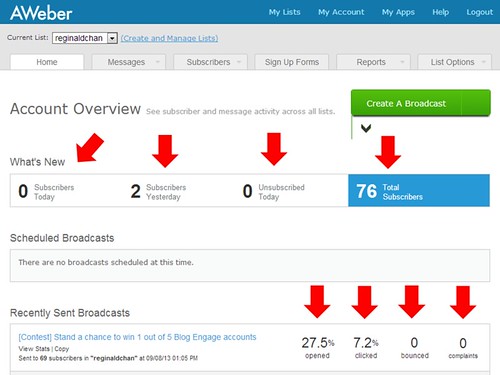
    With the simple but detailed dashboard, AWeber users are able to easily analysis their email strategy to increase click and open rates.

    For those analytics lovers out there, this is probably the best feature AWeber can ever offer. On the dashboard, you are able to see simple yet complete report at one glance.

    This means that you are able to see the number of new subscribers, scheduled broadcasts and even broadcast history on email clicks and opens.

    Not only that, AWeber offers a very indepth information on the report tab which I will show you in a video shortly below.

    6. RSS to email

    Simple RSS to Email by AWeber Communications
     

    Honestly, I am not a fan of automated stuffs and recently, my buddy Gilbert asked me why I didn’t use this godly feature.

    I told him that I rather have something ‘not automated’ for my mailing list but that question really struck my mind.

    Since Neil Patel (I am a huge fan of his) is also using the RSS to email service provided by this lovely mailing list tool, I see no reasons why I shouldn’t right?

    Truthfully, I haven’t REALLY use this feature much but this is one feature that will save you a lot of time.

    Imagine that you want to keep your blog followers updated on your new post and creating a new newsletter could be very time consuming. With AWeber RSS to email feature, you are basically putting technology on good use!

    To think about it, having a tool to that automates email notifications to your readers at any time of your choice is indeed indispensable.

    Why should you REALLY use AWeber for your mailing list building?

    Now, I know how tired it is to read such a long blog post right? So, here’s another video which I had done personally explaining what AWeber is and how it can actually save you more money (plus improving your sign up rates).

    Basically, I will be showing you around:

    • What AWeber autoresponder is all about
    • How the dashboard looks like
    • How to create a broadcast on AWeber
    • How to setup simple but beautiful signup forms
    • AWeber analytics as well


    Back to you

    What do you think of this blog post? I hope you enjoyed reading this article and watching the video as much as I do. So, tell me. What is your favorite email marketing tool?

    It doesn’t really matter if you have one right now as you can easily signup for AWeber for only $1 with a full 30-days money back guarantee right now!

    Click here to get best AWeber discount

    All you need to do is to click right here: Try AWeber today for only $1 or 100% money back guarantee!

  • Email Campaign: How I Build My Email List From Scratch

    Email Campaign: How I Build My Email List From Scratch

    Email list is more than just a list. In fact, it is the black book for nearly every successful marketer, blogger and companies alike.

    Don’t worry if you have not started anything at all.

    This article will explain to you important things about starting an email campaign … opps, I mean building a successful mailing list.

    That’s why you’re here right? With so many email marketing guides out there, I want to make sure that the time spend on this article (expected to be 10 minutes or less), would provide you guidance which will prove useful not only today, but for the coming years.

    Do you know what is email campaign and the importance of it?

    There are several reasons why you should start building an email list right now. You may use the list to:

    • Grow your website traffic
    • Keep your readers informed on the latest posts and news
    • Increase the number of returned visitors
    • Boost your sales pitch and revenue earning (marketing)
    • Promote brand awareness
    • Get involved and get in touch with your loyal readers

    There’s probably tons of other advantages that you can gain just by having an email list but you get the point. It doesn’t matter what industry you are in … you need a list.

    Still not convinced? Let’s take a look below:

    1. Ana Hoffman – Traffic Generation Cafe

    Traffic Generation Cafe opt-in form
    Traffic Generation Cafe opt-in form


    2. CopyBlogger Media

    CopyBlogger Media's opt-in form
    CopyBlogger Media’s opt-in form


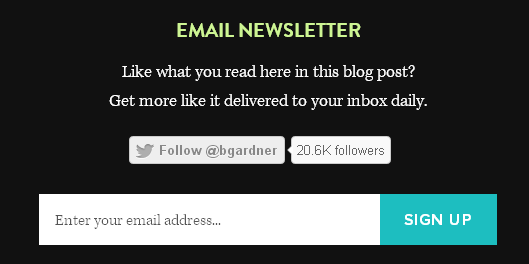
    3. Brian Gardner

    Brian Gardner's opt-in form
    Brian Gardner’s opt-in form


    4. WP Beginner

    WPBeginner's opt-in form
    WPBeginner’s opt-in form


    5. Adrienne Smith

    Adrienne Smith's opt-in form
    Adrienne Smith’s opt-in form


    6. Bren – My Girly Parts

    Bren's opt-in form
    Bren’s opt-in form


    7. Annetta Powell

    Annetta Powell's opt-in form
    Annetta Powell’s opt-in form


    8. Adam Connell – Blogging Wizard

    Adam's opt-in form
    Adam’s opt-in form

    You see, it doesn’t matter what’s your intention is … either to boost traffic or doing affiliate marketing. You need a god damn email list! 🙂

    Three Easy Ways To Build An Email List … My Way

    I know there are probably many ways to do this but these are the three, very easy methods to grow your email list. Yes … you can start building your mailing list with just $1.

    When I started this website, I was like you … you know, wanting to grow my traffic and get my visitors back for more. The only way is to build more loyal readers who trust and have faith in me.

    Creating an email list from scratch is hard and no easy task. Hopefully by the time you finish implementing these three methods, you’ll be able to gain good and stable moment of subscription rate.

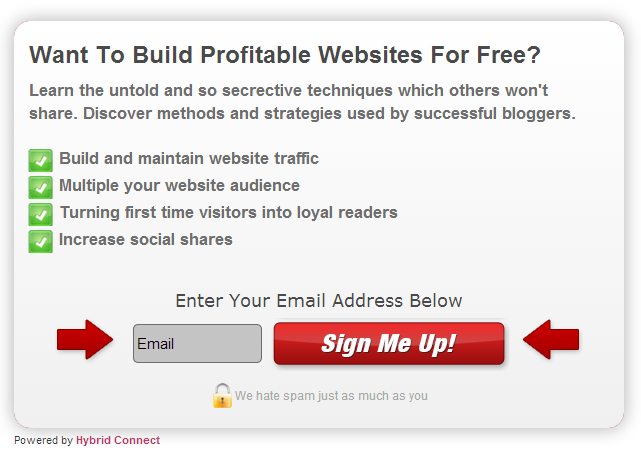
    Hold on a second now. Do you know how an opt-in form works? Not? No frust! The below an example of my opt-in form. Just enter your email and try it out! Yes it is absolutely free and if you dislike it, just hit the unsubscribe!

    Method #1: Choose your email marketing provider

    I’m not talking about Gmail, Yahoo or Outlook guys. I’m talking of auto responders, scheduling email blasts and managing your subscribers list. Most importantly, a program or service which could help me build my successful email campaigns.

    There are probably tons of email marketing providers out there to choose from; from freemium to more than just affordable subscriptions.

    Basically, these features are a must in any email marketing provider:

    • Ability to create signup or opt-in forms
    • Easy to embedded in any form (HTML, codes etc)
    • Manageable subscriber lists
    • Auto responders
    • RSS subscriptions
    • Spam control

    If you have yet to start creating any email list, then I would highly recommend you to start now using Aweber. Here’s why:


    Try AWeber’s Autoresponders for $1


    Method 2: Split testing your subscription forms (must … must have feature!)

    This is important guys. Most of us are attracted to colours and the same concept goes to subscription forms. If placing just one form on the same spot will not increase your signup rate, then you should be doing more split testing.

    So what is split testing actually?

    Split testing is also know as A/B testing. Let’s say you in a course of one month, you created one signup form to be placed on your sidebar. And, you aren’t getting any signup at all! So, what’s wrong?

    Could it be the colour, text or even the size? Fact is, we would probably not know the real reason behind this.

    BUT …

    It doesn’t mean that you can’t do anything about it! You can perform tests and more experiment to determine which signup forms offer the best click through rate (CTR) and which isn’t.

    If you have the thought that those are crazy, time consuming and it takes a lot of patience to do it, yes you are definitely right. Duh! Imagine how much time you got to spend on this split testing.

    There is where Hybrid Connect comes in. Hybrid what?

    Hybrid Connect is an advance mailing list building plugin for WordPress created by the famous Shane Melaugh. Well, it doesn’t matter if you don’t know how he is. What you need to know is the plugin is more than just plain awesome.

    Basically, Hybrid Connect is about customization, improve your call to action ‘projects’ and ensuring that you are maximizing every possible chance to build email list. What?

    Hybrid Connect is not like any other WordPress plugin when it comes to building email list. It does more than just that!

    Here’s what it looks like on my admin panel:

    Hybrid Connect is an advance email mailing list plugin for WordPress
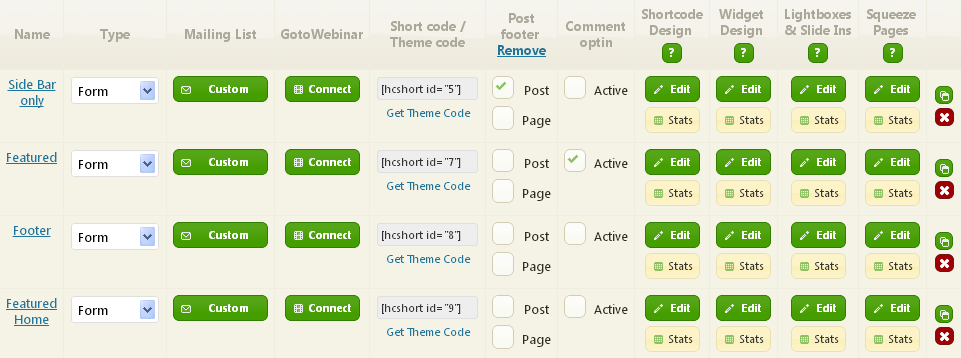
    Hybrid Connect allows me to build specific opt-in forms for different pages and post.

    And this is what Hybrid Connect can do for you.

    You can choose from:

    • Shortcode – Place any opt-in form anywhere in your content
    • Widget – Add any opt-in form to the sidebar or any other widget area
    • Light boxes – Create pop up opt-in form features
    • Slide in boxes – Allow forms to slide in from the bottom, side or top of the page or post
    • Squeeze pages – Create high-converting squeeze pages for sales boost
    • Comment list building – Option to opt-in with one click, when they leave a comment

    If you want to know what Hybrid Connect is all about, this site explains it all.

    I’m not saying that Hybrid Connect is the best out there. But for me, it works absolutely well and I see no reason why it won’t work for you … plus I love their support team who is always willing to help out.

    Lesson learned? Always test and try out different forms to improve your sign up rates. Heard about “don’t put all your eggs in one basket?”

    Method #3: Maximizing your click through rate (CTR) of your opt-in forms

    You may use Hybrid Connect and a dozen more email list building software but you won’t be going anywhere if you are not getting any clicks.

    To get your readers signing up for either a product sale or a simple newsletter, you got to make your opt-in form visible. Yes, make your call-to-action as attractive as possible. Here are some spots which works perfectly well to increase your CTR:

    • Featured area (before content)
    • Sidebar area (top or bottom most)
    • After content area (some call it after post)
    • Footer area
    • Floating or pop up opt-in form

    Personally, if you want to increase your sign up rate, you should place your opt-in form on the top most of the article … place it right before the title area. I call it, featured widget.

    Placing featured call to action widget could easily grow email list
    This is one of my featured opt-in call to action.

    Why?

    When I first started my website, I had only a few signups per week. If you ask me, that isn’t making the cut. Not even close! After placing a featured opt-in form for just one week, my CTR increase by 15% on average. Yes, imagine for every 100 visitors I get, I would get about 15 signups. Since I’m using Aweber, I know they are absolutely legit and that’s great!

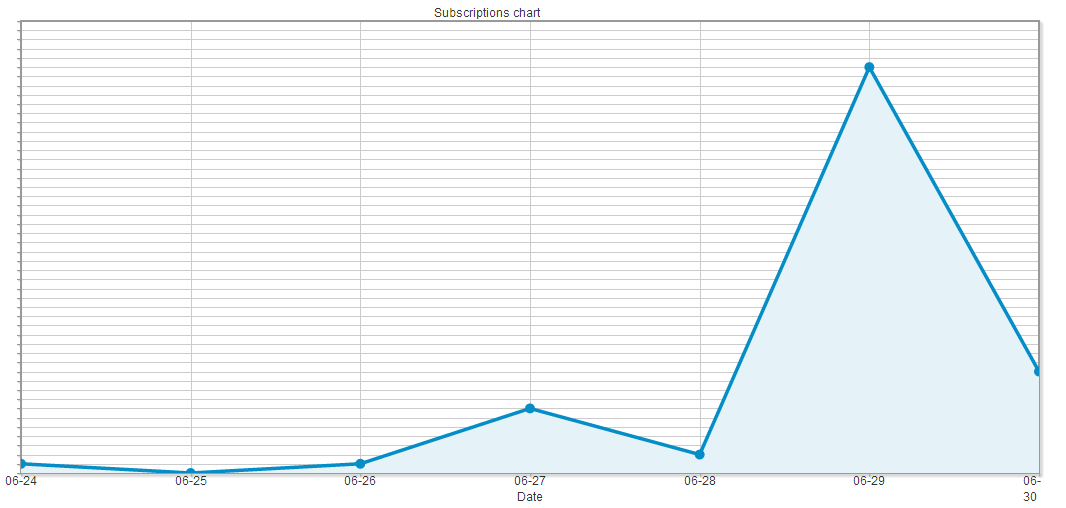
    Now this is my sign up graph or stats.

    Stats
    My sign up stats increased drastically right after I place an opt-in form on my featured area

    As you can see above, I wasn’t getting any healthy sign up rate. I would get probably 2 a day at most and sometime zero. With a call to action widget placed on the most visible part of the website, everything changes. I would let the stats above speak for itself.

    From featured area to sidebar. Yes! You need to place at least one sidebar opt-in form on your sidebar if you want to grow your email list. When it comes to opt-in on side bar, you got to make it precise and short because you have very limited space to work with. So keep that in mind!

    Basically, after post and footer opt-in forms are pretty normal and I wouldn’t into detail on that. However, I want to shift your attention now to the importance of having a pop up opt-in form.

    Fact: You can increase your email list with pop up opt-in forms but …

    Now, tell me this. Does the above question makes you wonder?

    I hate pop up and I bet most of you do. So, making pop up opt-in form is tough especially when you do not want to drive your readers away.

    A few things to consider are:

    • How often does the pop up will appear?
    • What type of pop up opt-in form to use? Complex or simple?
    • Does your readers get to view the pop up every time they head to a new page?

    As I said above, pop up is very annoying and therefore, handle with care. My pop up will show be visible after my reader is on that page for a specific time and I love going simple but eye catching opt-in forms. And to add a little bit of twist, I set cookie where the same reader will only see the pop up once every 7 days.

    Again, what works for me might not work for you. So, do some testing first before anything else.

    If you are still having doubts whether you should start an email list or not, you definitely need to spend 5 minutes watching these slides.

    Back to you

    I was lucky to speak to some bloggers last week and I realized some of them have yet to start building email list for their blogs and websites. I started pretty late but I’m sure, it is never too late for anything.

    Do you see the advantages when it comes to building a strong relationship with your readers?

    All in all, email list is very important especially when you are thinking of increasing your traffic and getting your loyal readers coming back for more. Not to forget, having an email list is also a great way to communicate with your followers.

    You need to do this right now:

    1. If you like this article, subscribe to my free and once-a-week newsletter (below)
    2. Tell me what you think on building an email list
    3. Do you have any past experience to share with the rest?

    And you can do all these using the forms below and hit the red button to share it.

  • WPMU DEV Hosting Review: A Comprehensive Look at Performance, Features, and Support

    WPMU DEV Hosting Review: A Comprehensive Look at Performance, Features, and Support

    In the ever-expanding universe of WordPress solutions, WPMU DEV has carved out a name for itself by offering a plethora of tools and plugins to enhance the performance and management of WordPress sites.

    But with the evolution of their services, WPMU DEV has embraced a new frontier—fully managed hosting. In this WPMU DEV hosting review, we delve deep to discover whether this hosting platform is the game-changer your WordPress site needs in 2023.

    WPMU DEV: A Brief Introduction

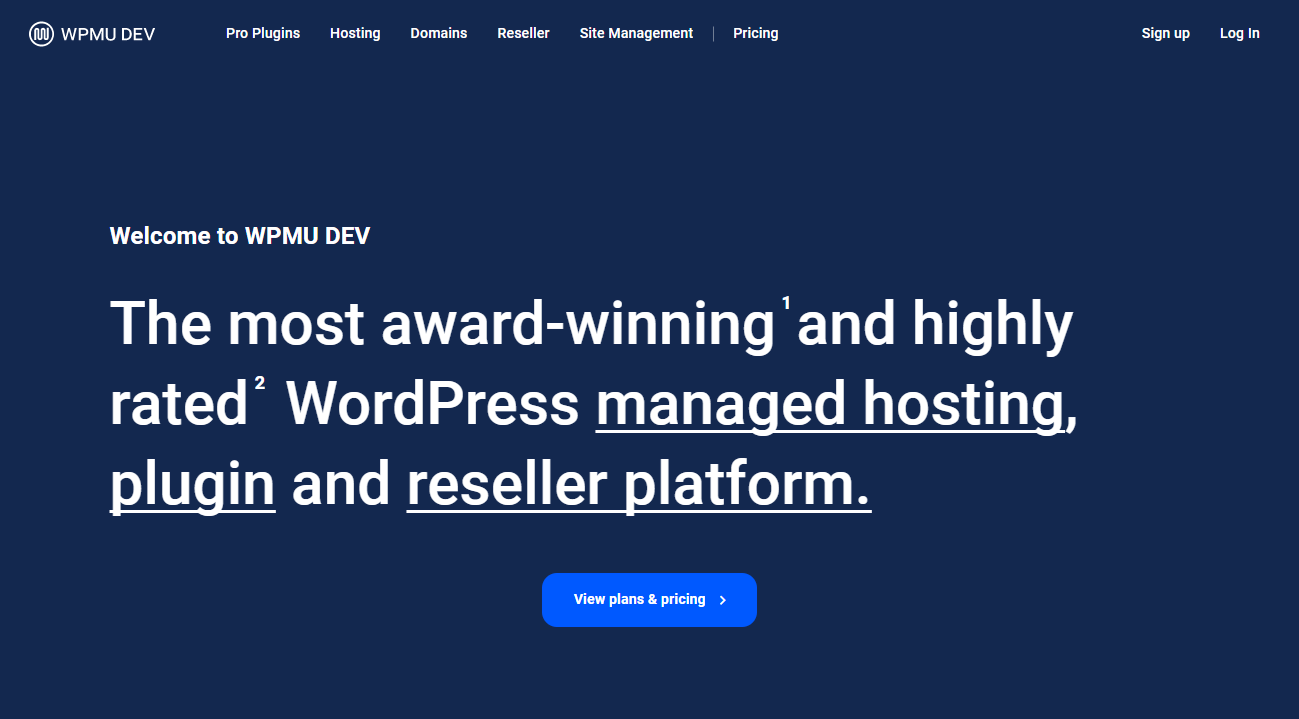
    WPMU Dev Hosting

    WPMU DEV is part of Incsub—the parent company behind other WordPress stalwarts like CampusPress and Edublogs—securely positioning itself as an experienced player in the digital arena. What makes WPMU DEV stand out is its hands-on approach to providing an integrated ecosystem for websites, boasting a selection of premium services, themes, and plugins. Aimed at freelancers, agencies, and entrepreneurs, their hosting packages promise dedicated resources and top-tier performance.

    Here’s what you will find in WPMU Dev hosting plans:

    • Location Flexibility: Choose from a diverse selection of 18 data center locations for hosting your site, with options including various regions in the United States (both east and west coast), the United Kingdom, Germany, Singapore, among others to optimize for your target audience.
    • Enhanced Security: Benefit from robust security measures with WPMU DEV’s in-house services like Defender and Automate that offer file scanning, an advanced firewall, and the added security of two-factor authentication.
    • Optimized Speed: Experience lightning-fast hosting thanks to the integration of WPMU DEV’s wide array of services and tools, such as object and page caching, alongside the latest in technology with IPv6 and CDN (Content Delivery Network) support.
    • Reliable Backups: Gain peace of mind with automatic incremental nightly backups and the convenience of a one-click restore feature to safeguard your site’s data.
    • Effortless Staging: Take advantage of a dedicated staging environment to test and modify your site before pushing changes live with the simple click of a button.
    • Seamless Migration: Transition your site smoothly to WPMU DEV hosting using the platform’s automated migration tools, or have the support team conduct the migration for you at no extra charge.
    • Complimentary SSL Certificate: Secure your hosted sites out-of-the-box with a free SSL certificate provided through Let’s Encrypt, ensuring visitors’ connections to your site are encrypted.

    But are they the right fit for you? Let’s find out.

    The Hosting Experience with WPMU DEV

    Choosing the right WordPress hosting service can hugely impact site performance—and ultimately, your bottom line. WPMU DEV is offering a fully managed VPS hosting solution that promises to elevate your website’s performance by providing isolated resources for each website. But what do these promises translate to in real-world applications? We put WPMU DEV to the test using industry-standard tools like Pingdom and K6 to monitor performance metrics that matter.

    Testing the Performance

    Our Pingdom tests returned varying load times, heavily influenced by the location of the test servers. Load times are indeed crucial, but WPMU DEV’s feature that allows you to choose a server location tailored to your target audience means you can minimize these disparities. For more globally balanced performance, setting up a CDN with WPMU DEV could be beneficial.

    We initiated our website’s performance evaluation using five diverse Pingdom test servers located around the world. The loading speeds for our sample website from each location were as follows:

    • Washington D.C.: 0.677 seconds
    • San Francisco: 1.01 seconds
    • London: 0.241 seconds
    • Sydney: 1.98 seconds
    • Tokyo: 1.64 seconds

    These figures reflect tests conducted with the default Twenty Twenty theme of WordPress.

    Observing the data, it’s evident that while the website loads reasonably quickly, the loading times demonstrate significant variation in relation to the geographical position of each server.

    K6 test on WPMU Dev hosting

    Our second evaluation involved conducting a load impact assessment, which entails emulating the behavior of 25 concurrent visitors on your website over a span of three minutes to observe any fluctuations in load times. The outcomes were quite remarkable.

    In our WPMU DEV Hosting Load Impact Review, it’s evident that even though there was a minor increase in response time (depicted by the blue line), the scenario with 24 virtual users active on the site (indicated by the green line) resulted in a load time of merely 348 milliseconds.

    Hence, if your venture involves running a modest-sized blog or commercial site on WPMU DEV hosting, you can be confident that increases in visitor traffic will not compromise your website’s load times.

    Seamless Integration and User Experience

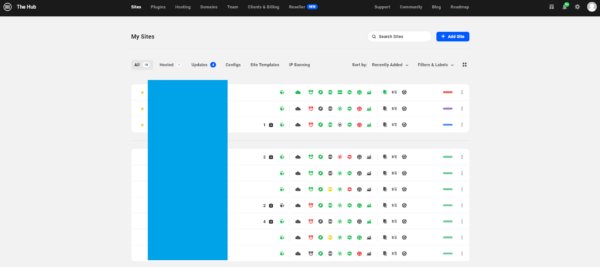
    Managing multiple sites using WPMU Dev client hub

    True to its ethos, WPMU DEV doesn’t just stop at hosting. It extends its interface—aptly named the Hub—for a comprehensive management experience. From site setup to activating various plugins and monitoring analytics, the Hub centralizes all operations in a user-friendly dashboard.

    The question remains: does this integrated approach truly streamline the process for users from various backgrounds? Our experiences suggest a resounding yes; the processes are streamlined, and even WordPress novices can navigate the interface with ease.

    Complementing Your Site with Pre-installed Tools

    Upon setup, your WordPress dashboard will greet you with pre-installed WPMU DEV plugins, spanning across essential categories like security, optimization, and marketing. This preemptive measure ensures you’re equipped to tackle various aspects of site management right from the start, potentially saving valuable time and effort.

    Support: WPMU DEV’s Safety Net

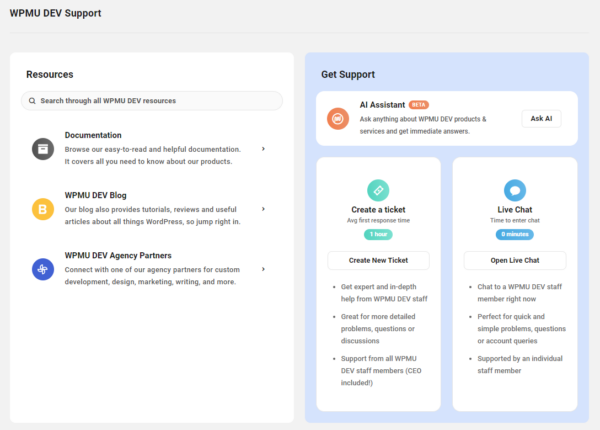
    Live chat support for WP MU Dev customers

    Beyond infrastructure and user interfaces, the soul of a hosting service often lies in its support system. WPMU DEV’s customer support includes not just a vast knowledge base but also dedicated support channels. Available membership packages provide various levels of access to these resources, allowing you to tailor your support experience to your specific needs.

    Pricing and Plans

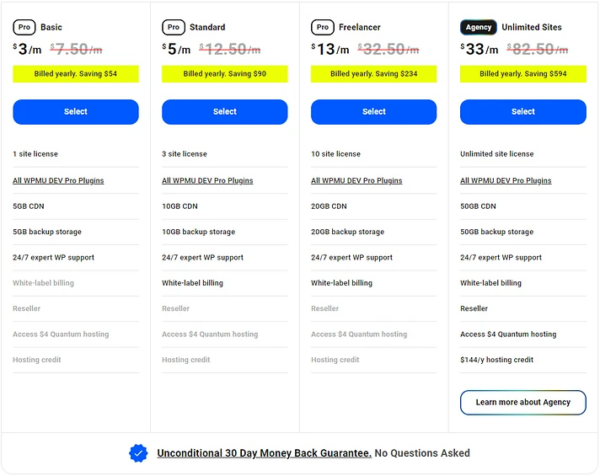
    WPMU Dev hosting plans

    WPMU DEV offers a variety of membership options tailored to different needs.

    • Agency Membership: For $33 monthly (Black Friday Cyber Monday deal only), enjoy the privilege of using all WPMU DEV services and plugins across an unlimited number of websites. Additionally, this plan includes a $144 credit that can be applied to any hosting package.
    • Freelancer Membership: At a cost of $13 every month, this package allows the management of up to 10 websites and provides full access to the complete suite of plugins.
    • Standard Membership: Priced at $5 per month, this option permits the setup of up to 3 websites while granting unrestricted access to all available plugins.
    • Basic Membership: For an economical $3 monthly fee, this plan enables you to establish a single website and also ensures access to the full range of WPMU DEV plugins.

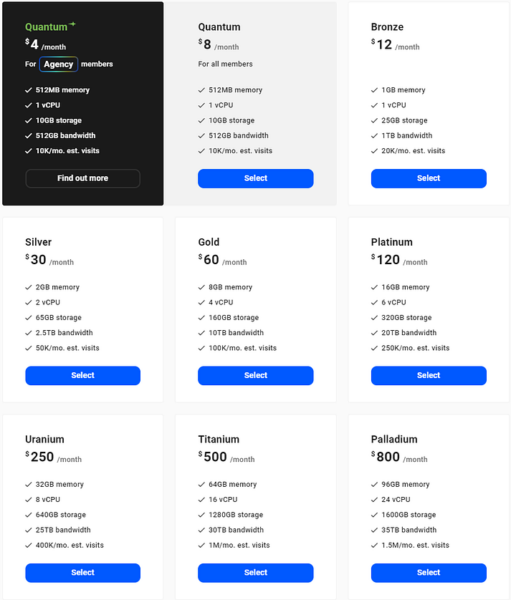
    WPMU DEV acknowledges the diverse needs of WordPress sites by offering nine distinct hosting plans, each with varied resources and options.

    WPMU dev hosting pricing

    Whether you manage a single site or a sprawling network, there’s likely a plan to match your requirements. A 30-day free trial sweetens the deal, granting you the freedom to evaluate their services without initial financial commitment.

    WPMU DEV versus The Competition

    While WPMU DEV’s all-in-one model presents a compelling proposition, it’s not without alternatives in the market. If you find yourself still on the fence, exploring other managed WordPress hosting services, such as those boasting lower price tags but still robust offerings, could be a beneficial exercise.

    Final Thoughts: Is WPMU DEV the Right Choice for Your Website?

    The hosting world is a battleground of promises, and WPMU DEV certainly makes some bold ones. With impressive performance test results, a user-friendly management dashboard, an array of plugins, and unwavering support, WPMU DEV positions itself as a premium, all-encompassing WordPress hosting solution.

    Sites ranging from small blogs to business behemoths could find a home with WPMU DEV, assuming the pricing aligns with their budget. And with the option to trial the service free for 30 days, making an informed decision has never been easier.

    We hope this deep dive gives you clarity on whether WPMU DEV is the hosting hero your WordPress site has been waiting for. Remember, the digital landscape is always evolving—stay informed, choose wisely, and may your site’s performance soar.

    Is WPMU DEV the right hosting service for your WordPress site? Let us know your thoughts, questions, or experiences in the comments below. And for those still seeking, continue your journey with our collection of the best managed WordPress hosting services available today.

    Have more inquiries regarding WPMU DEV? Whether it’s their legitimacy, offerings, or comparisons with other hosting providers, don’t hesitate to reach out. Your perfect hosting match awaits—and we’re here to help you find it.

  • The Ultimate Use Of Artificial Intelligence In Different Fields

    The Ultimate Use Of Artificial Intelligence In Different Fields

    Artificial Intelligence (AI), once a futuristic concept, has evolved into a transformative force with far-reaching implications across diverse fields. As the capabilities of AI continue to expand, its applications have become increasingly integral to sectors ranging from healthcare to finance, revolutionizing how we live and work. This exploration of the ultimate uses of AI will delve into its multifaceted impact across different domains.

    IMAGE SOURCE: https://pixabay.com/photos/technology-hands-agreement-okay-4256272/

    Retail: Customer Engagement and Inventory Management

    In the retail sector, AI enhances customer engagement and streamlines inventory management. Personalized shopping experiences are powered by recommendation algorithms that analyze customer behavior, purchase history, and preferences. These algorithms predict what products customers will likely be interested in, providing targeted suggestions and promotions. AI-driven chatbots, as well as virtual assistants are becoming increasingly prevalent in online retail. In this case, using a chatbot offers real-time customer support, answers queries, and guides customers through purchasing. Moreover, AI aids in inventory management by predicting demand, optimizing stocking levels, and minimizing overstock or stockouts.

    Manufacturing: Optimizing Production Processes

    AI is pivotal in modernizing manufacturing, optimizing production processes, and ensuring quality control. Smart factories leverage AI to monitor equipment health, predict maintenance needs, and reduce downtime. Robotics and automation, powered by AI algorithms, enhance efficiency on the production line. Supply chain management benefits from AI-driven predictive analytics, optimizing inventory levels and distribution networks. Overall, AI is transforming manufacturing into a more agile and responsive industry.

    Moreover, AI facilitates real-time data analysis, enabling manufacturers to make data-driven decisions for process optimization and cost reduction. Integrating AI-powered sensors and IoT devices enhances the connectivity of manufacturing equipment, creating a seamless flow of information across the production floor. This connectivity improves overall efficiency and allows for proactively identifying potential issues, fostering a more aggressive and preventative approach to maintenance.

    Healthcare: Precision Medicine and Diagnosis

    In healthcare, AI is at the forefront of ushering in a new era of medicine and diagnostics. Machine learning algorithms analyze vast datasets, including genetic information, patient records, and clinical research, to identify patterns and correlations humans might overlook. AI-powered diagnostic tools can assist healthcare professionals in identifying diseases at earlier stages, leading to more effective treatment plans. Moreover, AI contributes to the personalization of medical treatments. By analyzing individual patient data, AI algorithms can tailor therapies to specific genetic profiles, optimizing outcomes and minimizing adverse effects. This enhances patient care and accelerates the pace of medical research and drug development.

    Agriculture: Improving Crop Yields

    AI addresses the challenges of feeding a growing global population in agriculture by improving crop yields and resource utilization. AI-driven technologies like precision farming analyze data from sensors and drones to optimize planting, irrigation, and harvesting. Machine learning algorithms predict crop diseases and pest infestations, allowing farmers to take preventive measures. AI also assists in monitoring livestock health and managing farm equipment, contributing to sustainable and efficient agriculture practices.

    Furthermore, AI empowers farmers with valuable insights into climate patterns, enabling them to adapt and mitigate the impact of climate change on crop production. Integrating AI into agriculture also facilitates the development of autonomous farming machinery, reducing the dependency on manual labor and increasing operational efficiency. Beyond the field, AI-based analytics provide farmers with market trends and demand forecasts, aiding in strategic crop selection and distribution decision-making.

    Finance: Algorithmic Trading and Risk Management

    AI has become a game-changer in the financial sector, particularly in algorithmic trading and risk management. Machine learning algorithms analyze market trends, historical data, and real-time information to make split-second trading decisions. These algorithms are able to process vast amounts of data at speeds unattainable by human traders, optimizing investment strategies and maximizing returns. Additionally, AI-driven risk management systems assess potential threats and vulnerabilities in financial portfolios. By continuously monitoring market fluctuations and identifying patterns indicative of risks, AI helps financial institutions mitigate potential losses and make informed decisions. The result is a more agile and adaptive economic landscape.

    Transportation: Autonomous Vehicles

    The transportation sector is undergoing a profound transformation with the integration of AI. Autonomous vehicles powered by AI algorithms are on the horizon, promising safer and more efficient transportation. AI-based traffic management systems optimize traffic flow and reduce congestion. Predictive maintenance using AI helps prevent breakdowns in fleets, minimizing disruptions. Additionally, AI contributes to the development of intelligent logistics, improving route planning and delivery efficiency.

    Also, AI enhances passenger safety by constantly analyzing real-time data to anticipate and respond to potential hazards on the road. The development of AI-driven communication systems between autonomous vehicles ensures coordinated and efficient traffic flow, reducing commute times and environmental impact. As AI continues to evolve, the transportation sector is poised to witness a shift towards autonomous vehicles and the integration of AI in public transportation systems, revolutionizing how people move within cities and beyond.

    Education: Personalized Learning and Virtual Assistants

    AI is revolutionizing the learning experience in education by enabling personalized and adaptive learning platforms. Machine learning algorithms analyze students’ performance, learning styles, and preferences to tailor educational content and pace. This individualized approach ensures that each student receives a customized learning experience, addressing their strengths and weaknesses. Virtual assistants powered by AI also enter classrooms, supporting students and educators. These assistants can answer queries, offer additional learning resources, and provide real-time assignment feedback. Integrating AI in education enhances the efficiency of learning and fosters a more inclusive and accessible educational environment.

    Furthermore, AI facilitates the development of intelligent educational tools, such as interactive simulations and immersive virtual reality experiences, making complex subjects more engaging and understandable. The continuous analysis of student data by AI algorithms allows educators to identify areas where additional support is needed, enabling timely intervention and support for struggling students. As AI continues to evolve, the integration of natural language processing in virtual assistants holds the potential to create more interactive and conversational learning experiences, further enriching the educational journey for students of diverse learning styles and backgrounds.

    IMAGE SOURCE: https://pixabay.com/illustrations/futuristic-science-fiction-fantasy-3862179/

    The ultimate use of artificial intelligence transcends industry boundaries, permeating every facet of our lives and shaping the future of various fields. From healthcare to space exploration, AI’s transformative capabilities continue to redefine possibilities, ushering in an era of innovation and efficiency. As AI technologies evolve, so will their impact, unlocking new potentials and reshaping the landscape of human endeavors. The journey of artificial intelligence is one of continual exploration, adaptation, and the pursuit of the extraordinary.