Share on facebook
Share on twitter
Share on linkedin
Share on whatsapp
Share on reddit
What Is Podcasting? The Podcasting History
Podcasting was first discovered and developed in 2004 by Adam Curry (former MTV video jockey) and Dave Winer (software developer). Adam Curry and software developer Dave Winer. Curry wrote a program, called iPodder, that enabled him to automatically download Internet radio broadcasts to his iPod. Several developers improved upon his idea, and podcasting was officially born. Curry now hosts a show called The Daily Source Code, one of the most popular podcasts on the Internet.
It is save to say that the history of podcasts starts from iPod and since then, it has been used as a marketing tool for businesses to get more brand visibility and reach a wider audience. At this point of writing, podcasting is still a very popular in the United States and Europe, and lesser in parts of Asia. However, the constant growth of podcasting had shown intrigued many business owners and online marketers in starting their own podcast.
Podcast Equipment List
Discover the best podcast starter kit for beginners right here.
Read More
Table of Contents
Podcast and Regulations
Currently, podcasting is free from government regulation. Podcasters don’t need to buy a license to broadcast their programming, as radio stations do, and they don’t need to conform to the Federal Communication Commission’s (FCC) broadcast decency regulations. That means podcasters can discuss anything and everything under the sun—from four-letter words to sexually explicit content.
However, copyright law does apply to podcasting, though. Podcasters can copyright or license their work—Creative Commons is just one online resource for copyrights and licenses.
Getting Started With Podcasting
Podcast is easy to start and most beginners start with a home studio. Podcast doesn’t rely in public rating (to certain extend) the subject matter of podcasts can range from the refined to the silly to the excruciatingly mundane.
If you perform a search on Apple iTunes store, you will find many different popular podcasts around the world—from crime solving to marketing tips.
Apart from that, it is important to note that there are also podcasters who publish daily, weekly and monthly podcast as a full day job. Podcast advertisement is a popular method to monetize a podcast (one of the best example is Entrepreneur On Fire).
How Much Can I Make From Podcasting?
Last but not least, this is a popular question asked by many. If you have a high downloadable podcast series (at least 10,000+ downloads per episode), you can make anywhere from hundreds to thousands of dollars each month.
Popular podcasters such as John Lee Dumas from Entrepreneur On Fire makes an easy $100,000+ per month with podcasting. You can see his income report here.
About Me
Young at heart and a deep passion for entrepreneurial success, Reginald is devoted to share everything he had learned about online marketing with the public. Follow him for more awesome postings.
Share on facebook
Share on twitter
Share on linkedin
Share on whatsapp
Share on reddit
The Best Podcast Starter Kit (for one or more podcast hosts)
Congratulations. You found this post and it shows that you are devoted to start a podcast (and you are need the best podcast equipment packages). I absolutely get it.
This article is all about getting and using the right tools—best studio microphones, podcast mixer and even the best podcast kit for both beginners and serious podcasters. With the ever growing trend in the podcasting world, there are so many podcast starter kits that you can choose—thanks to Amazon and Google.
I understand the challenges you face (or will face) when it comes to finding recording a podcast. While you can easily start a podcasting show, don’t forget that using the right podcast equipment is going to help you develop and publish better audio experiences.
Starting a podcast is more than just considering the audio quality. A good microphone and other podcast gears are required to record and upload quality podcast for your listeners. You will find some of the best and most affordable, lower budget podcast equipment in this post.
The best equipment for podcasting boils down to the following:
Microphone
Recording software
Podcast mixer
Podcast hosting
These are the common podcasting starter kit that you need to have, before you are able to launch a podcast.
Carry on reading below to find out the best podcast equipment packages and of course, feel free to mix and match them—based on your needs.
BONUS: You will also find some awesome studio equipment bundle to help you get started with podcasting. Click on any of the tools shared in this article and you will be redirected straight to Amazon for the best podcasting equipment deals.
Table of Contents
TL;DR Best Podcast Equipment Packages for Beginners
1. Podcast microphone. My favorite microphone for podcasting is Audio-Technica ATR2100-USB. One of the coolest microphone that doesn’t cost a bomb—and produces excellent voice. If you are a podcast beginner, this is the best microphone for podcast beginners. By far, this is the best USB mic that costs under $70.
2. Podcast recording software. You can use GarageBand if you have a Mac or Audacity if you have a PC (Audacity works on Mac too). This is the best free recording and editing software. Since you are just starting out, it is wise not to overspend on podcast equipment. Adobe Audition is a great recording software if you are willing to spend some dollars each month!
3. Podcast hosting. Last but not least, you need to have a podcast host (in order for others to download and listen to your podcast). There are many podcast hosting companies and I recommend you to start use Buzzsprout podcast hosting (use this link to get a free $20 Amazon gift card).
Buzzsprout offers unlimited storage, unlimited team members and simple-to-read analytics reports to help you grow your podcast show.
This is often the best option for podcast beginners. Most beginners start with solo podcast. Therefore, here is the line up for the best podcast equipment kit.
Intermediate Level Microphone: Blue Yeti USB Microphone
While Blue Yeti microphone is a popular podcasting microphone for beginners, this microphone is often used by intermediate podcasters too. It comes with USB only (sadly), but has a ton of features and great sound quality.
What are the best podcast equipment starter kit for intermediate podcasters?
The best podcast equipment packages that I had personally experience is:
Blue Yeti USB Microphone
Blue Radius II shock mount
Heil PL2T boom
Alternatively, there is also Rode Podcaster Booming Kit that consists of podcaster, PSA1 ARM and PSM1 shock mount. If you are wondering, rode is a well-respected brand in the microphone and audio equipment industry. This podcasting equipment can be setup quickly and easily without needing to spend extra money.
Most podcasters avoid solo podcasting because it is boring and it is challenging to get enough traction. With 2 or more persons podcast, the common setup would be 2 XLR microphones or studio headphones.
The answer to this is because by default, you re not able to record more than 1 USB microphones into one computer. To host more than one podcaster, you’ll need a USB audio interface or mixer with at least as many XLR microphone inputs as you have hosts.
Here are the best tools I recommend for multi-person budget podcasting:
Behringer Ultravoice Xm8500 Microphone
On Stage Foam Windscreen
CBI MLC20 Low Z XLR Microphone Cable (20ft)
Audio-Technica ATH-M30x
Entry Level Podcast Equipment Kit
Headphones for Multiple Podcast Hosts: Audio-Technica ATH-M30x
Again, Audio-Technica equipment is up for grabs. When you have more than one podcast host, having a good headphone does offers many advantages.
How many do you need when you are hosting multiple podcast hosts?
Simply get 2x, 3x or 4x of those 4 things.
What’s next will be a little confusing. So, I’ll try my best to explain the best that I could.
Having more microphones is always needed when you have multiple podcast hosts. However, this also means that you need a solution to plug in multiple pairs of headphones simultaneously.
The HA400 contains 4 high-power stereo amplifiers that maintain the highest sonic quality even at maximum volume levels. Ultra low-noise 4580 operational amplifiers are included for outstanding audio performance – these are the same op amps found in “full-size” audio equipment – plus, a DC 12-Volt adapter is included.
Next, you need a USB interface or mixer (depending on how many people you have).
IMPORTANT: The above mixers don’t have multi-track output to your computer, meaning you won’t be able to edit each person individually. I recommend you to choose a USB interface if you need this option.
Bear in mind that at some point in your podcasting journey, you will need/want extra inputs. Make sure you take some time to consider the options you have because these podcast equipment may have similar pricing but a vast differences in the sound quality.
In order to kick start the review, you will need:
Microphone (for each podcaster)
XLR cable (for each podcaster)
USB interface or Mixer (w/ USB in/out)
Looking for the best podcast equipment packages? These are optional but recommended:
Microphone stand
Shock mount
Windscreen or pop filter
Studio headphones
Microphone: Rode Procaster
Dynamic broadcast microphone that comes with studio boom arm and elastic suspension mount.
You don’t have to look far and wide for this. If you are looking for podcast equipment packages that are great for both beginners and serious podcasters, Rode podcast equipment package is best to none (Rode Procaster, Rode PSA 1 Boom Arm, and Rode PSM 1 Shockmount).
This podcast equipment kit is a big step up from the beginner multi-person kit and for the price, it is definitely worth the money.
Headphones: Audio-Technica ATH-M50x Headphones
This headphone is an awesome choice—and you certainly can’t go wrong with them. Regardless you are solo podcast or multiple host podcast, this microphone is going to serve you well.
As the most critically acclaimed model in the M-Series line, the ATH-M50 is praised by top audio engineers and pro audio reviewers year after year. Now, the ATH-M50x professional monitor headphones feature the same coveted sonic signature, with the added feature of detachable cables. From the large aperture drivers, sound isolating earcups and robust construction, the M50x provides an unmatched experience for the most critical audio professionals.
Watch this video to learn more about it.
Audio Interface/Mixer (2 XLR, 4 XLR or 6+ XLR inputs)
This is tricky and can be confusing. Depending on your needs (2, 4 or 6+ XLR), the podcast equipment kit will defer widely.
Here’s what I recommend:
2 XLR inputs:
Mixer: Yamaha AG06 (only channel 1 has phantom power)
If you jumped to here, the microphone kit is the same as the solo section (with other top-notch options as well). The Universal Audio interfaces are fairly expensive, but you can safely use a less expensive model (like from the intermediate section right above here) with the other gear recommendations.
Microphone, Boom & Shock Mount
Introducing, the Godly all-in-one podcasting kit for professional podcasters—Heil PR-40 Microphone, Heil PL-2T Boom Arm & Heil PRSM Shock Mount
Because all of these dynamic mics are known to be quiet, I highly recommend pairing them with the CL-1 Cloudlifter (for each mic). It converts phantom power into a very clean +25dB gain. Cloud Microphones has a CL-2 (2 mics) and rack mountable CL-4 model as well.
When it comes to professional boom arm usage, Heil PL-2T Boom Arm is very decent (and highly recommended). You can’t find another similar quality with this pricing.
Headphones
It really varies based on taste and requirements. My personal favorite? Shure SRH940 Headphones.
Using the right podcast equipment starter kit is an important step, especially when you are starting a podcast.
As a beginner in podcasting, you might want to consider starting low and lean—this means that if you are wondering “how much money needed to start a podcast?”, the answer would be under $150 at the most.
What do you think? I hope you find this article on the best podcast equipment packages useful and please share with your podcast fellow friends!
About Me
Young at heart and a deep passion for entrepreneurial success, Reginald is devoted to share everything he had learned about online marketing with the public. Follow him for more awesome postings.
Share on facebook
Share on twitter
Share on linkedin
Share on whatsapp
Share on reddit
The Best of the Best Productivity Apps for Bloggers
The blogging world is a complicated one and bloggers are often lack of time. As most of us are bloggers as a side hustle, using productivity apps will help to make us more productive. So, what is the best productivity apps for bloggers?
In this article, we are going dive deep into the tools that I personally use to automate my blogging business.
Table of Contents
1. Google Keep
If you are searching for a quick note pad, Google Keep is an excellent choice. Advantages of using Google Keep are:
Sync with your Google account
Google Keep mobile app is super clean and lean
Easily create notes and input different forms of media into notes
Ability to create templates for repeated usage
Google Keep is free to use, forever
You can start using Google Keep by signing into your Google account.
2. Evernote
For those who wants more flexibility in note taking, you can’t go wrong with Evernote. Some of the advantages using Evernote are:
Save, organize, and sync typed text, audio recordings, reminders, images, images with handwriting, sketches, and content clipped from the web
Clip material from the web
Annotate uploaded documents and images
Chat with teammates (requires Business account)
Easy segment notes with different Notebooks and Tags
Comes with free and paid version (that starts at $9 per month)
Make no mistake. Click Up is the ultimate Evernote alternative. The advantages using Click Up are:
All-in-one tool for Project Management, Agile Methodologies, and Budget Management
Gantt Chart
Kanban Tools
Reminders and notification
Free and paid plans available (that starts at $5 per month)
Click Up is one of the cheapest productivity apps for bloggers. At $5 per month, you literally get unlimited everything—from users to custom reporting tools.
The process to manage multiple WordPress websites is always a hassle. Updating WordPress core products, plugins, themes and managing spam comments could take hours to complete, especially when you have more than 5 websites.
With ManageWP, you can easily manage these websites with one simple dashboard and automate everything. Apart from that, you also get:
1-click admin access
Add unlimited WordPress sites for free
Team and client collaboration
Backup and restore
Clone and migrate sites
Uptime monitoring
Sucuri Security Check
Performance check
White lable
Client reports
SEO ranking and reports
Comes with free and paid versions (at $1 per additional feature)
As a freelance web developer, you have absolutely no idea how much time ManageWP saves me monthly. The 1-click everything allows me to manage multiple websites without having to login to the wp-admin.
If you love kanban boards, you are going to love Trello. With Trello, you can drag and drop any content from one board to another. Here’s a list on why Trello is a great tool for bloggers:
Labeling, tags, and comments are great ways to organize content
In-line editing
Progress meter checklist
Easy integration with DropBox, Google Drive and Box
Comes with free and paid version (at $9.99 per user per month)
Freelance copywriters love Grammarly (including me). Grammarly is an awesome productivity app for bloggers that help you turn normal writing into professional ones.
Here are some features that Grammarly offer for all its customers:
Misspelled words
Comma splice
Comma usage
Repetitive words
Plagiarism checker
Tone of voice adjuster
Integration with Microsoft, Google Docs and many others
At this point of time, Grammarly does not offer any free plan with pricing starts as low as $11.66 per month with unlimited usage.
Grammarly Premium is a perfect fit for those who always aim to reach the next level, whether they’re at work, at school, or in pursuit of other ventures.
Where do you store backups for your website, podcast and videos? The safest way is to have them stored in the cloud such as Dropbox. Dropbox is not your average file sharing app for bloggers. It provides Dropbox Business which is excellent for bloggers who need more firepower such as team collaboration and creating a centralized content platform your team (like for your virtual assistance and guest bloggers).
Here are some additional features that Dropbox offers:
In the time where there are so much information and so less time, bloggers need to streamline their entire day work including getting the right information at the right time.
Feedly is an excellent RSS curator and tool to help bloggers get the most updated content under one roof. Instead of having to visit each blog and content, you can easily integrate RSS feed into Feedly and have them nicely arranged in a custom layout for your reading (or flipping in this case).
Here are some of the advantages using Feedly:
Follow your favorite publications, blogs, YouTube channels and more in one place
Organize content into collections
Read content in a distraction-free mode
Save content for later within the app or save to a read-it-later service
Easily share stories on social media
Discover new content based on your interests
The best part about Feedly? It is free to use and if by any chance you need more firepower and features, there is a premium plan (called Feedly Pro) that starts at $6 per month.
If This Then That (IFTTT) is a powerful productivity app for bloggers. IFTTT helps your apps and devices work together in new ways.
With this app, you can create triggers and actions which are carried out automatically. For example, you can set automatic tweeting of your new blog post once you hit the ‘publish’ button.
Some crazy things that IFTTT can do (involving or not involving bloggers) are:
Automate everything (from turning on the lights to automatic posting photos
Marketing integration
Social media automation
Connecting your Google Home or Alexa for advance voice assistance
Zapier is a great alternative to IFTTT and this is my main app that I use to automate my blogging works. Here are some of the popular Zapier features:
More than 1,500 apps to integrate with
Easily build workflows in just a few clicks
Best for bloggers, support team, and business owners
I integrate Zapier with Evernote and Google Docs for faster blogging works, idea generation and even brainstorming. Overall, Zapier is easy to use and definitely one of the top productivity apps for bloggers.
This is my go-to social media automation app for all my blogging works. With MeetEdgar app, I can easily craft powerful social media content and schedule the content for automatic delivery … forever.
That’s exactly how I can post hundreds if not thousands of social media posts in a month on automation.
Is MeetEdgar right for you? It’s best for me because:
Auto-Variations features automatically finds quote-worthy text from articles or blogs
Its Chrome extension automatically generate up to 5 pre-written social media posts directly from the article
Easily create a custom category-based schedule like Blog Posts on Tuesdays and Cute Animals on Fridays
What is your favorite productivity app for bloggers?
I hope you find this article useful. What is your favorite productivity app that you are using right now for blogging?
Tell me more on Facebook right now!
About Me
Young at heart and a deep passion for entrepreneurial success, Reginald is devoted to share everything he had learned about online marketing with the public. Follow him for more awesome postings.
Share on facebook
Share on linkedin
Share on twitter
Share on email
The time of the year is here again. You will find the best Black Friday and Cyber Monday deals here. More importantly, these are not the deals that are just average—these are Black Friday and Cyber Monday deals that I’m getting this year (myself).
If you are a blogger, Internet marketer or affiliate marketer, you are going to love this. Period.
I have breakdown the Black Friday and Cyber Monday deals to several categories.
Web hosting companies are known for throwing massive discounts during Black Friday and Cyber Monday. This year, WP Engine is the top winner this year by offering 5 months FREE on any annual shared plan. This offer valid from Wednesday, November 20, 2019 to Monday, December 2, 2019. Use ‘CYBERWKND30’ to get this WP Engine discount.
Flywheel is known for its powerful web hosting services for creative agencies. For this Black Friday and Cyber Monday, get 40% off on any Starter plans, 25% off on any Freelance and Agency plans and 25% off on any Add-ons subscriptions. Use ‘FLYDAY19’ upon check out or click the button below to instantly enjoy the offer.
BlueHost, my oh my. it doesn’t matter it is the holiday season, or you are simply searching for the best BlueHost Black Friday and Cyber Monday discounts. Get up to 60% off of hosting, domains, and more this year. The best part? There’s no coupon code etc. Just click the button below to grab the best BlueHost deal.
Do you know that WP Beginner recommends HostGator? HostGator is my first web hosting company that I engage with and I have seriously nothing but all love for them. With this Black Friday and Cyber Monday deals, get HostGator web hosting as low as $1!
Are you looking for massive Black Friday and Cyber Monday deals for NameCheap? If yes, you are in luck! NameCheap is throwing up to 99% off storewide during this festive season. This is one deal you certainly don’t want to miss at any point.
Long Tail Pro or LTP in short, is this year’s best SEO tool deals for Black Friday and Cyber Monday. If you want to start ranking on search engine, find long tail keywords or dominate your competitors, you need this SEO tool right now. From November 25 to December 2, get 50% discount on all annual plans and 30% on all monthly plan. You can’t go wrong with SEO, and you certainly can’t go wrong with Long Tail Pro! All plans come with 10-days money back guarantee too (if you ever doubt this tool).
I can’t remember how many times I talked about KWFinder as the most affordable SEO tool in the market. This Black Friday and Cyber Monday made this SEO tool even better—with 25% lifetime discount! If you are finding for Ahrefs alternative, get KWFinder now.
Searching for the best SEMrush discount? Mark your calendar as this Black Friday and Cyber Monday, SEMrush is offering massive discount for new signups. Along with it’s free 7 days trial, you will get discounted subscription pricing up to 30%!
SEOPress is one of the most popular SEO plugin for WordPress websites. The free version comes with pretty decent features (better than Yoast SEO) and the paid version of $39 is a killer for unlimited websites. You’re in for a massive treat this Black Friday and Cyber Monday. Get ready to unlock over 50% discount with SEOpress this festive seasons.
StudioPress is one of the world renown WordPress themes provider today and for this Black Friday and Cyber Monday, they are offering $100 discount on their famous, StudioPress Pro-Plus All Theme Package. Do you know that you can save up to $2,300 annually by going Pro?
Do you want to build beautiful website and fast? I recently migrated my website to Elementor Pro and it works like charm! Fast loading speed and massive support on it’s Facebook Group are added advantages. For this Black Friday and Cyber Monday, get up to 30% off with Elementor Pro.
Thrive Themes doesn’t offer Black Friday and Cyber Monday deals. But, for every purchase you make during this time of the year, they will donate the entire earnings to charity. This is an excellent time to give back to the community. By the way, $19 per month is super affordable!
Want to jump start your web development business for the new year? Beaver Builder is on discount right now (thanks to Black Friday and Cyber Monday). They are offering 25% discount off storewide; from licenses to upgrades, this is one deal not to be missed for massive savings.
If you are looking for the best WordPress theme deal for Black Friday and Cyber Monday, be hold. Get either yearly or lifetime license right now as the entire Elegant Theme store is on sale. You can’t get a better shopping discount than this one.
When it comes to lead generation, OptinMonster is the best tool I had ever used. This year, you can get instant 30% discount on all OptinMonster plans. The promotion runs from 25 November to 2 December 2019—so mark your calendars. Use code ‘BF2019’ to activate your black Friday and Cyber Monday OptinMonster discount code at the checkout page.
If Google Analytics puzzles you or you want to leverage the true power of Google Analytics, MonsterInsights is your best bet. Get 30% off and start analyze your Google Analytics data like a professional. Use ‘BF2019’ to unlock MonsterInsights discount.
Looking for an affordable trust plugin for WordPress? With TrustPulse Black Friday and Cyber Monday deal, you can now enjoy the best of TrustPulse features with 35% discount. This deal starts from 25 November and ends on 6 December 2019.
Want to create forms on WordPress that don’t suck? Introducing, WPForms. From conditional logic and ready-made templates, drag and drop your way to customize the forms—in anyway you like. Get 60% discount with ‘BF2019’ discount code.
When it comes to WordPress cache plugin (developer level), Swift Performance is one of the most powerful cache plugin that provide crazy customization to setup specific websites (for better caching). Get up to 70% discount during this festive season!
Looking for all in one WordPress tool that doesn’t suck? WPMU Dev is your best friend—offering super-powered hosting, support, site management, and plugins under one roof. This year, they are going crazy with Black Friday and Cyber Monday discounts. Sign up now and get 4 months of WPMU Dev Membership for free, every year, for the lifetime of your membership! No way!
What’s the biggest challenge for Internet marketers and bloggers? We lack time especially with marketing on social media. With MeetEdgar, you can easily schedule once and forget on social media platforms. With 1-click RSS integration and automatic content generator, you can get 4 months free usage of MeetEdgar when you sign up for their yearly plan!
Looking to start an email list this festive season? AWeber is offering discount email marketing price in conjunction with Black Friday and Cyber Monday. Bloggers, don’t miss this opportunity as you won’t see the AWeber discount as low as this!
Calling all course creators. ConvertKit is on sale this Black Friday and Cyber Monday. Get a full year access to ConvertKit, 3 months of Teachable, 6 ready made templates and lifetime access to Creator Pass courses and coaching right now.
Entrepreneurs, business owners and marketers face the same problem. We lack motivation, guidance and the right mentorship to go beyond our boundaries. For this festive season, get Tony Robbins coaching for yourself and love ones to have a great start to the new year. And above all, to be fulfilled in life.
Looking for the best tech deals for this Cyber Monday? This year, Appsumo comes with 5 crazy deals to help entrepreneurs save more money and become more productive. These deals are flaming hot—from Deposit Photos to Book Like A Boss, don’t miss these deals out (to save money)!
If you’re looking to use webinars to grow your online sales, then you’re in the right place. In this guide, we’re going to check out how ClickMeeting can help you with just that.
While there are several platforms you can use to run your webinars, not many can come close to ClickMeeting’s reputation, functionality, reliability and overall ease of use.
What’s more, ClickMeeting has recently rolled out its very own webinar flywheel framework, to make it even easier for their users to automate and build self-perpetuating momentum with webinars, which, in turn, puts you in great position to land more sales with less work.
Built to help marketers meet the demands of today’s self-service lead nurture processes, the webinar flywheel framework is built around several core components, including sharing knowledge, creating content and, one of its most appealing components, however, is its “automate and save time” element.
Thanks ClickMeeting’s emphasis on helping its users automate the various tasks involved with pre-webinar promotion, webinar delivery and post-webinar follow-up, marketers can allow their investments in building great webinar content to continue to deliver business value over time, without having to do a lot of repetitive and manual tasks.
Let’s check out how ClickMeeting’s webinar flywheel framework can help you automate your marketing and boost your sales.
1. Integrate the necessary tools and platforms.
Before you create your automated videos, you need to make sure that you’ve integrated the right tools and apps with your account. When you integrate these tools, automation becomes seamless.
For example, if you want to run a paid course, you’d want to integrate PayPal into your ClickMeeting account first.
If you want to share your webinar on LinkedIn, you’d have to connect your Linkedin profile, as well.
ClickMeeting offers several tools, apps, and platforms that you can connect with your account. Here are some you might want to consider:
Customer relations management (CRM). These integrations allow you to export your attendees straight to your HubSpot, InfusionSoft, Salesforce, or PipeDrive CRM account. From your CRM platform, you can then track nurture programs, score leads according to their webinar engagement, and view individual contacts’ interactions with your webinar materials.
Payment processing. PayPal lets you monetize your webinar and handle payments and transactions securely. This integration is critical for growing your sales if your webinar is the product unto itself.
Social media. Integrating ClickMeeting with your Facebook, Twitter, YouTube and LinkedIn profiles helps you run and promote your webinar on social media.
Analytics and tracking pixels. By configuring your integrations with Facebook Pixel, Google Analytics and Google Tag Manager, you can study your traffic, monitor clients and leads who visit your webinar pages, and engage them using retargeting ad campaigns.
Learning management system (LMS). You can also connect to the Moodle platform and manage delivery of your webinars as multi-lesson course experiences there. You only need to install the ClickMeeting plug-in to your Moodle account.
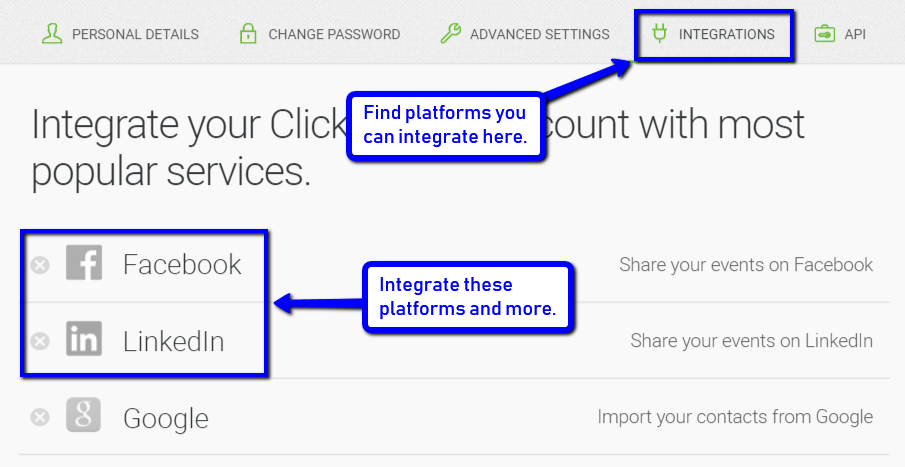
To integrate these apps, go to Account Settings > Integrations. You will see this page:
On the Integrations tab, you can see a list of options, as well as the tools you have already integrated.
Once you’ve already connected the apps, you can now start creating your webinars and setting up your automations with ease.
2. Automate your event.
If you’re worried about not being able to run your webinar live on a schedule, don’t fret. ClickMeeting can run it automatically for you. All you need to do is set up your event and preparations ahead of time. You can do this by running automated webinars. This feature is also useful for repurposing past webinars so that the content will continue to nurture new leads, without your having to prepare and deliver a presentation live every time.
To enable that setting, go to your dashboard and click Schedule Event > Room Type. Select Automated. Next, set the date, time, and time zone for your automated webinar.
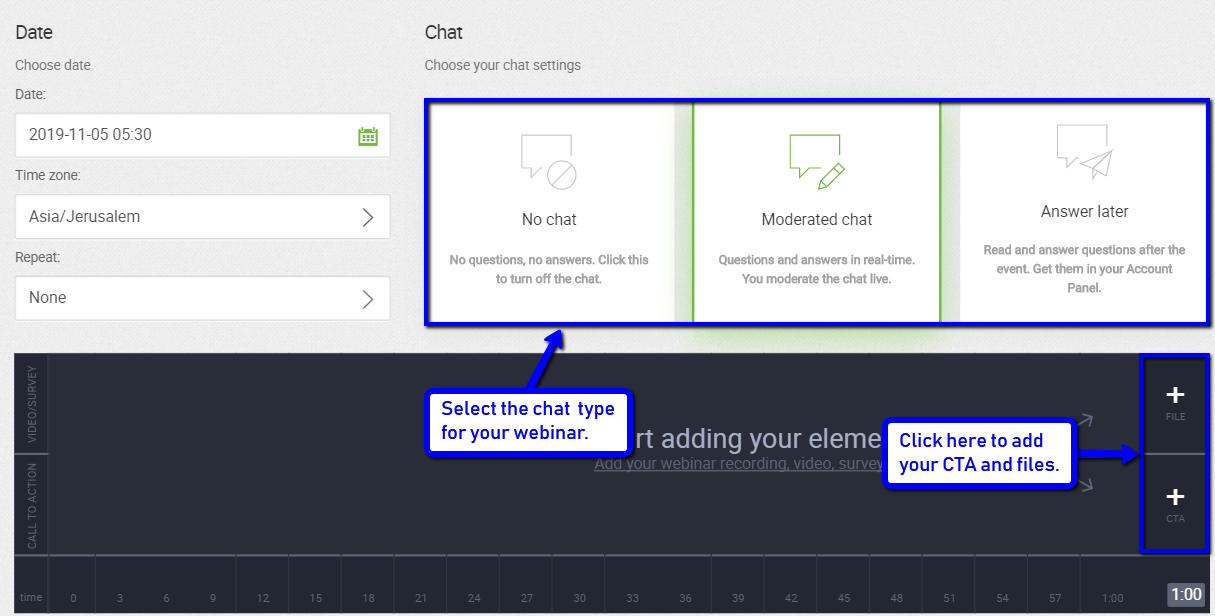
You can then select the type of chat feature that you want to employ for your event.
You can also choose to enable or disable the chat feature. If you’re running an automated webinar and won’t be available on the scheduled event, you may opt to have no chat box or to respond to queries at a later time.
Next, you can insert your video course recording, call-to-actions, and any other supplementary files or surveys at strategic points during your event.
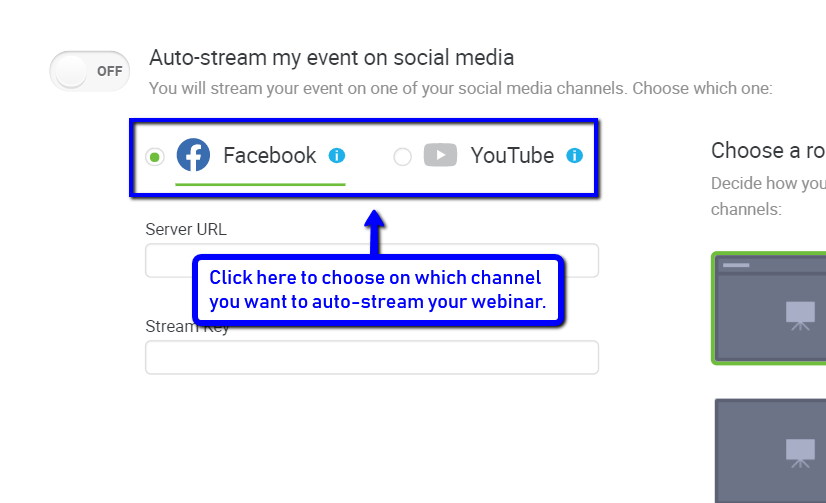
You can even choose to automate streaming your event on YouTube or Facebook. Go to Schedule Event > Automations > Event automation actions tab, and you will see this option:
Remember to enable the option to auto-stream and then select your desired social media channel. You can also automate other actions, like publishing on your profile page or sharing your webinar recording.
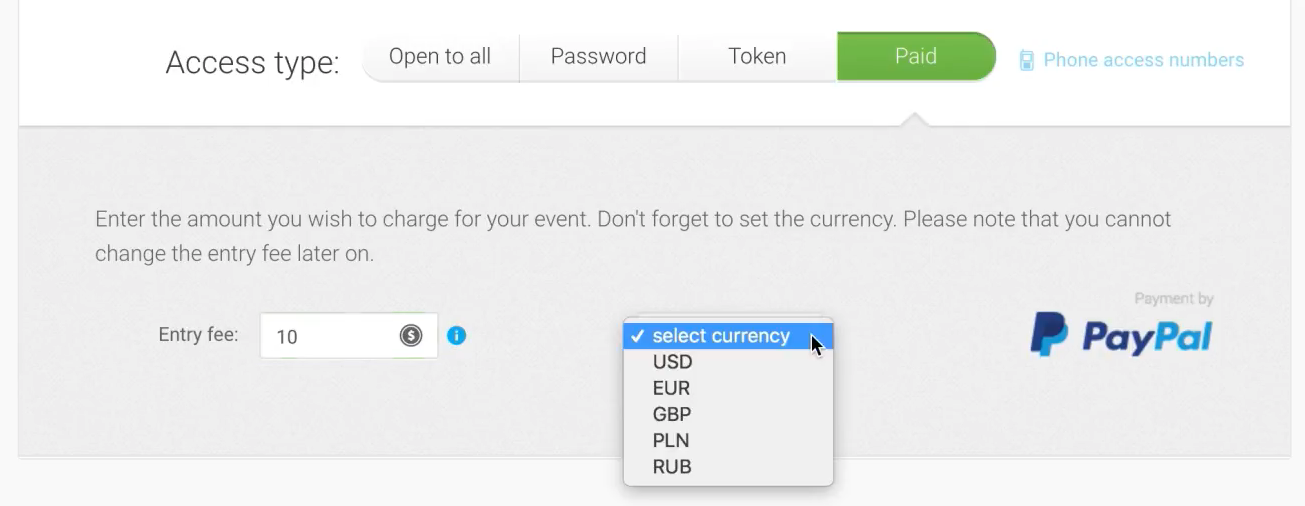
3. Select the ‘Paid’ access type.
Using webinars is one of the best methods you can use to make money online.
With your ClickMeeting automated videos, you can boost your sales by monetizing your event — that means, your viewers would have to pay to access your webinars. To manage your webinar fees, you first need to integrate PayPal.
Integrating PayPal lets you receive payments directly your PayPal account, according to the pricing point and currency settings you determine, and to easily authorize refunds in the contingency that this becomes relevant.
4. Automate your event reminders.
Using ClickMeeting, you can automate and personalize the promotion of your event.
You can prepare templates for email invitations and webinar reminders in advance of an approaching event. ClickMeeting will then automatically send them for you. Before you automate the delivery of your invitations and reminders, first customize your invitation and registration form to suit your branding.
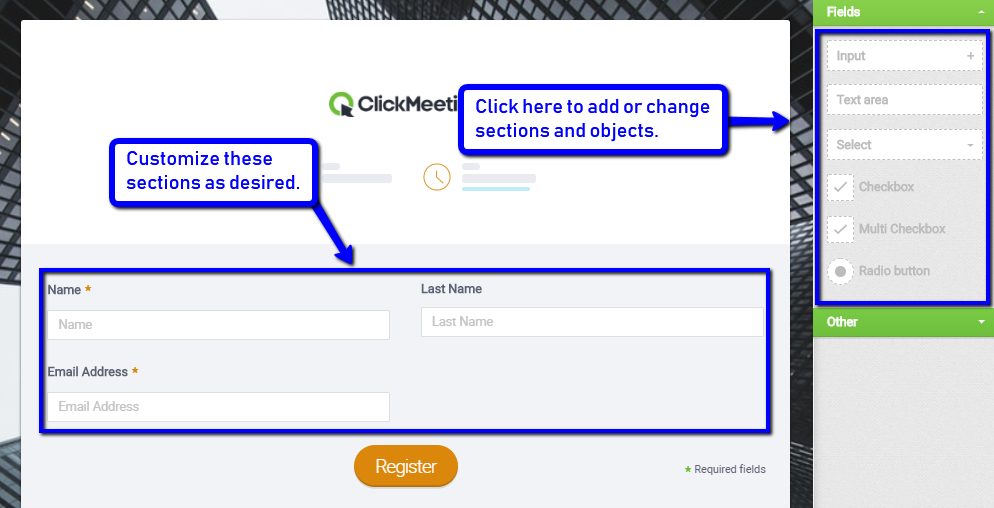
You can do so when you set up your event at the Schedule Event page. For your registration form, for instance, you can add or change sections and elements such as your presenter’s information, agenda, or an embedded YouTube video with a teaser preview of what will be covered.
Here is what the default registration form looks like:
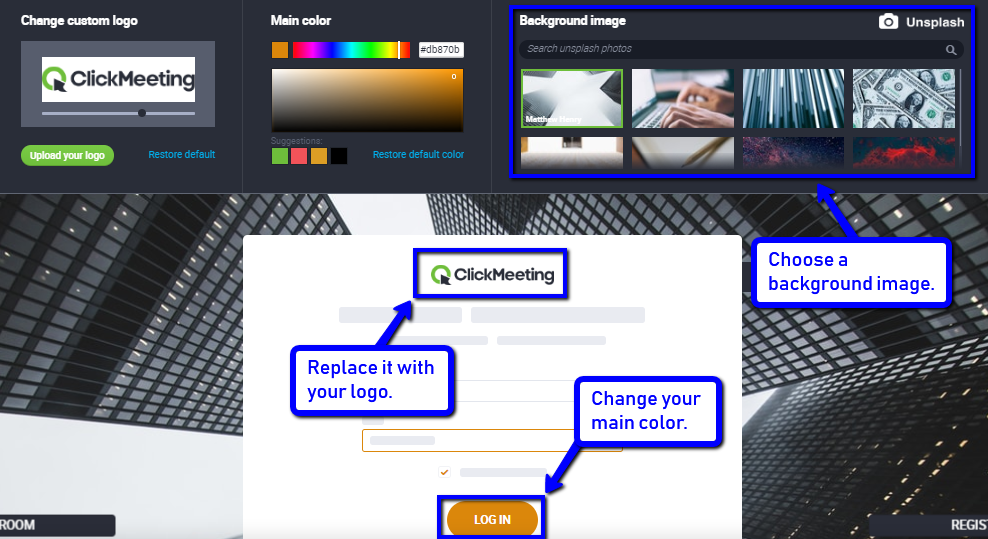
You can also modify your general invitation and webinar room login screen appearance, as seen below. You can upload your logo, change your button and main color, and choose a background image:
Once you’re done customizing your invitation and registration form, you can automate the delivery of event reminders.
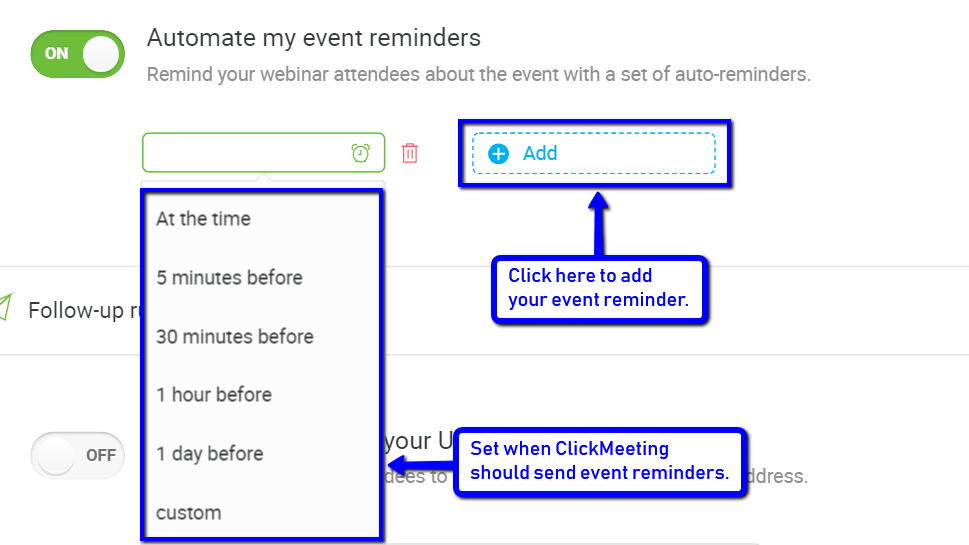
You can do so at the Schedule Event > Automations > Event promotion rules tab. Here is how it looks:
When you click Add, a dropdown menu of options appears. Choose when you want ClickMeeting to remind your attendees. ClickMeeting will then take care of notifying your registrants so they won’t miss attending your webinar.
5. Automate your post-event follow-up messages.
When it comes to maximizing the impact of your webinars, follow-up actions are arguably just as critical as the preliminaries and on-the-day tasks. People who registered but didn’t attend may want to know about opportunities to watch a replay. And those who did attend are likely nicely warmed up by the value your presentation delivered to them, so this is an opportunity to keep the nurture momentum going.
Using ClickMeeting, you can automate four post-event actions at the Schedule Event > Automations > Follow-up rules tab.
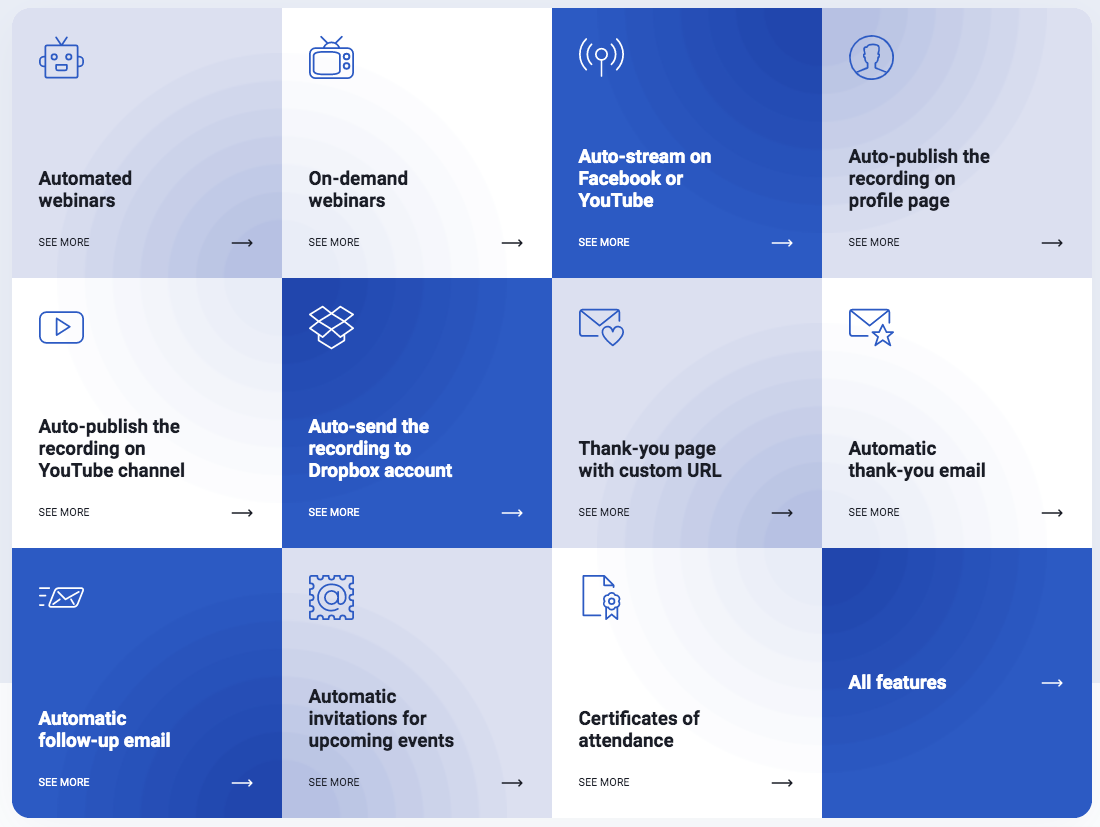
These are the four types of automation you can set up using Follow-up rules.
Thank-you page with your URL
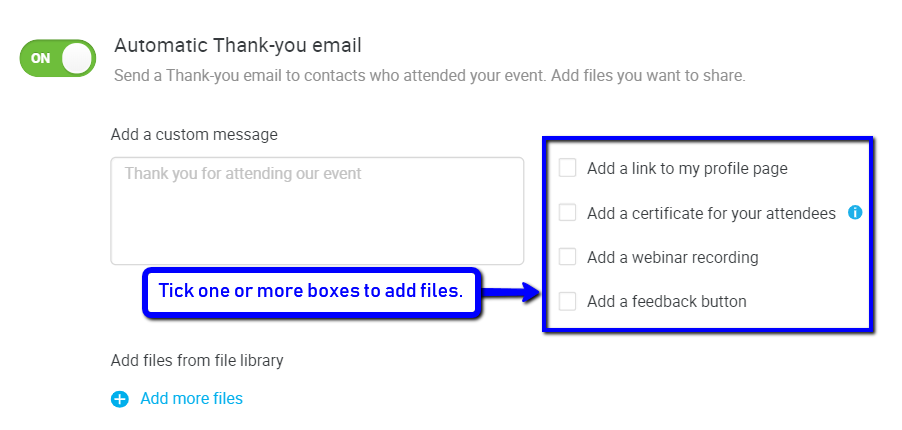
Automatic thank-you email
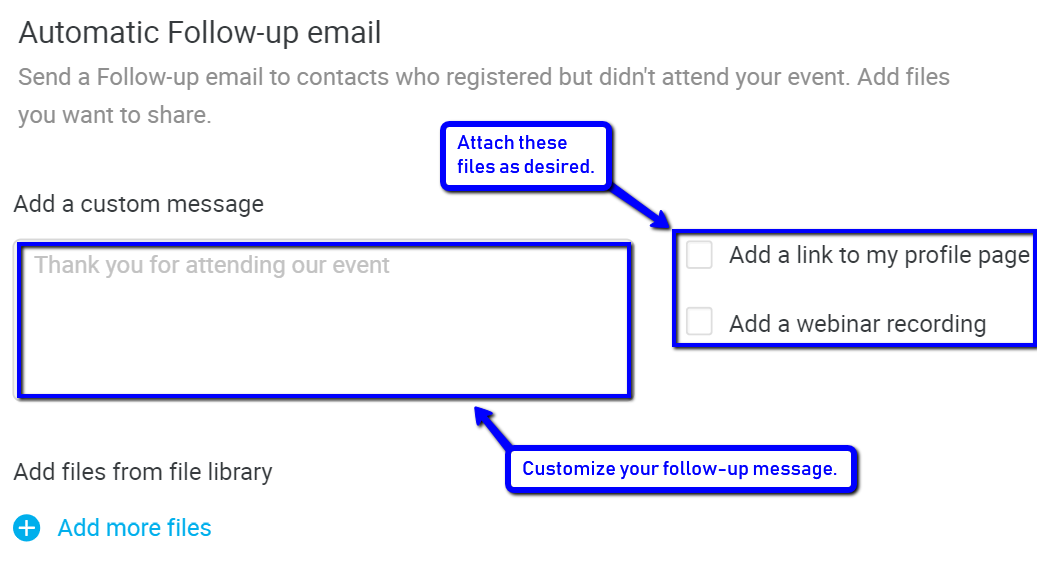
Automatic tollow-up email
Automatic invitations for my next events
ClickMeeting can redirect your webinar attendees to a thank-you page after the event ends. You only have to supply a URL for that page.
You can also send a thank-you email and attach files such as webinar certificates of completion or your webinar recording. You can also add a feedback button or a link to your profile page.
You can even opt for segmented automatic follow-up email delivery only to registrants who were unable to join your webinar.
You can add your webinar recording, your profile page link, and other files for their reference.
Finally, you can automate invitations to your upcoming events both to your webinar attendees and non-attendee registrants. All you have to do is select a pre-made event to invite them to.
This way, you can still loop in and nurture your leads, and recover lost conversions or sales.
Conclusion
Automated webinars are a powerful weapon to have in your arsenal. They are time and effort savers. Even if you’re not around to run them, you can still be productive and generate lots of sales, and having this option allows you to scale up on your webinar activity without doing more work.
ClickMeeting knows the power of automation for a successful webinar, as well. That is why the company has incorporated so many automation capabilities into its flywheel model.
Share on facebook
Share on twitter
Share on linkedin
Share on whatsapp
Share on reddit
The trend of blogging is more than ever before these days. Blogs have received immense attention since the start of the current decade. A lot of people read blogs and share their opinion in the comments section under these blogs. Blogs engage various people in productive discussions.
Blogs can be related to anything. Usually, bloggers choose a specific niche and share information relevant to specific topics like current affairs, sports, international politics, climate change, food, and traveling. Bloggers have a lot to do with shaping minds and making anything a word of mouth. That’s why blogs also play an important role in digital marketing.
Many businesses use blogs for affiliate marketing of their services and products. Plenty of bloggers are getting huge revenue because of the attention they get online. These blogs act as influencers and make various trends that common people want to follow.
There is a lot of potential in the field of blogging. Many people who are new to IT business, look to make their mark through blogging. New bloggers can make their mark in the blogging world through good content and a great marketing strategy. Quality content and excellent strategy can make any bog successful and trending around the world.
People love to know about new things and experiences of other people regarding travel, food, and plenty of other things. In addition to content and strategy, there are some other tools needed to rule the marketing world. Here is a list of top 3 tools for new bloggers:
Plagiarism is a menace that is a threat to quality content. Many websites published plagiarized content without the permission of the real owner. This is a bad act morally and ethically. Google and other search engines are taking action plagiarism and people behind it.
Plagiarism in blogs means lake of creativity and ideas. Google has developed multiple algorithms to figure out plagiarism and the real owner of plagiarized content. Once google identify plagiarized content on any website, it quickly gets removed and the website loses ranking immediately. If this happens several times the website gets blacklisted and it is immediately removed from Google search results.
For bloggers who are new to the blogging world, it is very necessary to limit plagiarism in the published content on their blog. A lot of people including bloggers use plagiarism checker tools to prevent plagiarism. New bloggers also need to evaluate their content on an onlineplagiarism checker before publishing it. Plagiarized content would not only be a harm to their blog but also affect their overall image online.
There are plenty of plagiarism checkers available online. A great tool to check plagiarism online is available on PrePostSEO.com. We would recommend the use of plagiarism checker to ensure that the content under consideration is plagiarism-free. Those who are new to blogging should make sure that their published content is not plagiarized otherwise they have to face consequences, this could also lead to legal action against the person involved in publishing plagiarized content. So, it is absolutely necessary to make blog plagiarism-free.
2. DA Checker by Softo.org
To plan a strategy for the success of a blog website or page you need to have proper knowledge of some SEO metrics. Domain authority is one such metric. It is used to measure the rank of any webpage. Basically, it is a scale ranging from 0 to a maximum of 100. Good domain authority means the probability of ranking a webpage’s URL on the first page of Google search results.
Domain authority plays an important role in bringing organic visitors to a webpage. There are multiple factors behind the Domain Authority ranking of a webpage. These factors are content quality, the total number of backlinks, age of the website, website design, graphics quality, the loading speed of the website, Moz metrics and plenty of other factors.
You need to calculate the Domain authority of your webpage to accurately strategize for improvement in ranking of your webpage. You can find various tools online to calculate domain authority of a webpage but one really useful tool is ‘Domain Authority Checker’.
This efficient tool enables you to check domain authority metrics of up to 100 URLs at a time. This Domain Authority checker will show detailed results including Domain authority, Page authority, Moz ranking, and IP address of all the URLs under consideration. You can use this tool to compare the domain authorities of two different webpages as well.
Moreover, you can save this detailed metrics report in the form of Excel format by clicking on the ‘Download Excel Report’ button. This tool is absolutely free to use and you can check the metrics of unlimited URLs through it. It will show all Moz metrics, IP address of the server, and Indexed pages on Google as well.
As blogs are used for digital marketing as well. Some content creators use a specific word a lot of time in the content. This word is regarded as a keyword to bring organic visitors to a webpage. Over repetition of keywords is taken as stuffing by Google. Sometimes Google rate websites or content with keywords stuffing as spam.
There is a lot of restriction on the use of a single keyword for plenty of times in an unusual way. Google has applied new algorithms in the system to counter keywords stuffing. After identifying content with keyword stuffing, Google lowers the rank of the website with spam (keywords repeated in an unusual way) content.
So, the bloggers and content creators need to calculate the keyword density of content before publishing on the website to prevent action from Google. This Keyword Density checker is a good tool for this purpose. The keyword Density checker helps you to calculate the keyword density and rectify your mistakes. It also helps in rectifying other mistakes in the content.
It also enables you to check the keyword density of content available online. If you are looking to calculate keyword density in an efficient way for free, then keyword density checker is a great option.
Summary
Bloggers need some tools to maintain the quality and improve the ranking of their published content. The above-discussed tools can be really helpful for this purpose. These tools are very important for those who are new to blogging and looking to make their mark in this competitive category.
In the end, we would like to say that the success of a blog is not an overnight affair, quality content is the key to success. Best of luck
About Me
Young at heart and a deep passion for entrepreneurial success, Reginald is devoted to share everything he had learned about online marketing with the public. Follow him for more awesome postings.